Top-down view of a gaming setup with monitor showing FPS game, RGB keyboard, mouse, headset, and a Wi-Fi router with glowing indicators connected by neon data stream lines on a dark blue-purple background
Internet Speed for Gaming by Platform and Game Type

Content
Your character's frozen mid-jump. You're watching enemies warp around the map like they're teleporting. Obviously it's your internet, right? Maybe not. I've seen players with gigabit connections lag worse than friends running 25 Mbps DSL. The difference? One had 150ms ping, the other sat at 18ms.
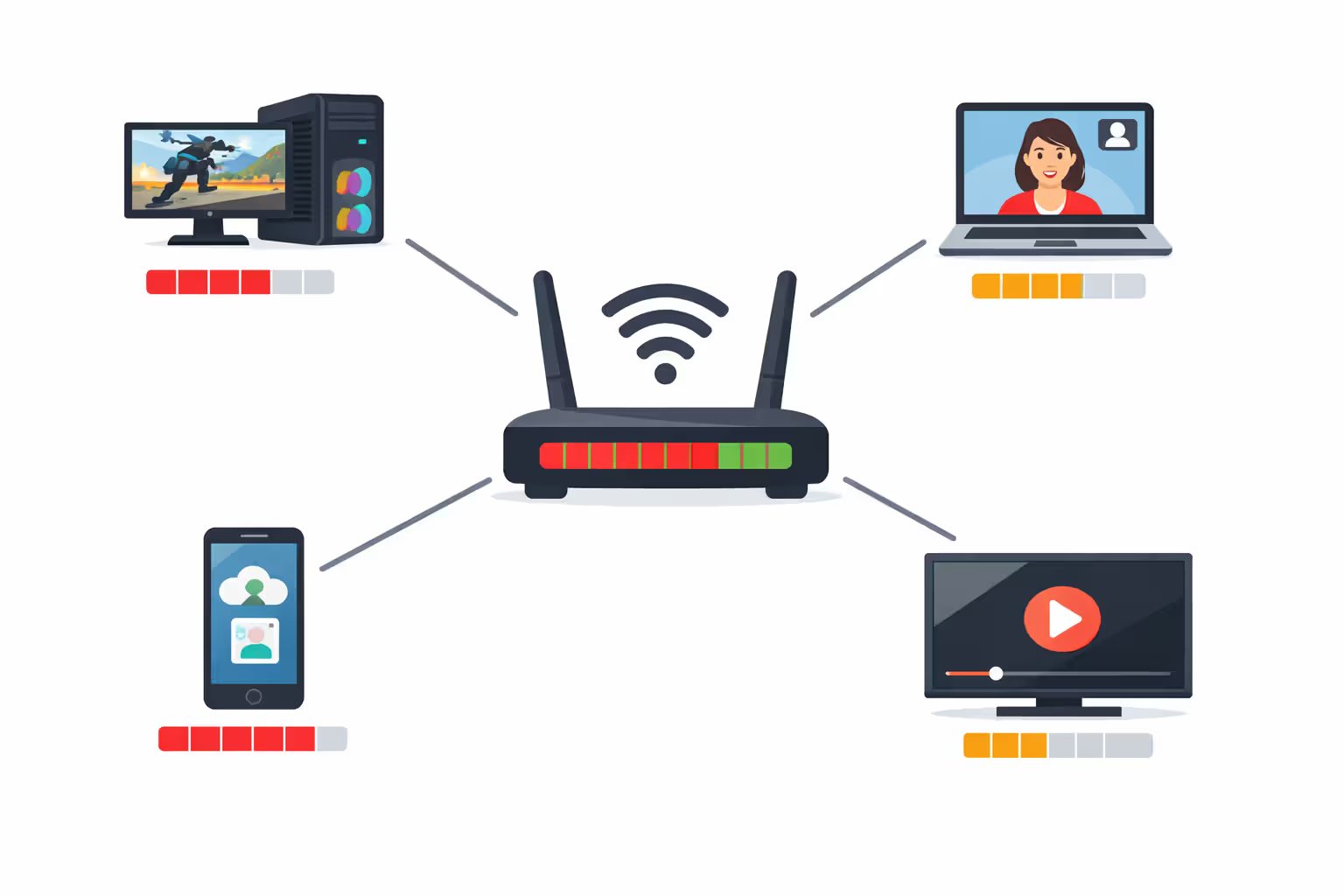
Speed matters, sure. But here's what actually determines whether you'll rage-quit or rank up: latency, packet loss, and whether your router can handle everything competing for bandwidth. Your teenager streaming TikTok, your partner on a Zoom call, your smart TV downloading updates—all fighting your game for attention.
Most gamers need 25-50 Mbps. That's it. Not the 1,000 Mbps your ISP's trying to sell you. The real question isn't "how fast" but "how consistent, how low-latency, and how much upload speed."
Minimum vs. Recommended Mbps for Online Gaming
Publishers slap "3 Mbps required" on their spec sheets. Technically accurate. Also useless.
That 3 Mbps assumes you live alone, nobody's streaming, your phone isn't backing up photos, and zero software updates are running. Real life doesn't work that way.
Playing solo? 3-6 Mbps download actually works fine for connecting to game servers. Online games send surprisingly little data—maybe 40-150 MB per hour. Less than one YouTube video. Your character position, button presses, what's happening around you—it compresses efficiently.
But then Tuesday arrives. 50 GB patch. Your internet's crawling. Three days until you can play again. That's why 3 Mbps stays theoretical.
I'd call 25-50 Mbps the sweet spot for real households. Games run smooth, patches download overnight instead of over-the-weekend, and when your roommate starts streaming Netflix, you won't notice. Plus modern life means four to fifteen devices online simultaneously—thermostats, security cameras, tablets, phones all chattering away in the background.
Want to rank up in competitive shooters? 50-100 Mbps makes sense. Not because Valorant needs that much (it doesn't), but higher-tier plans usually include better routing. Your ISP prioritizes premium customers during evening congestion. Less jitter, fewer lag spikes, more consistent performance when everyone's online at 9 PM.
Streaming your gameplay changes everything. Broadcasting while gaming needs 50 Mbps minimum. Go for 100-150 Mbps if you're serious about content creation. Twitch at 1080p/60fps eats 6-8 Mbps upload alone, plus your game, plus Discord voice, plus inevitable background noise.
How Much Speed Different Gaming Scenarios Actually Need
| What You're Doing | Bare Minimum | Won't Hate Yourself | Upload | Ping Target |
| Solo campaign/casual online | 3-6 Mbps | 15-25 Mbps | 1 Mbps | Under 100ms |
| Competitive FPS (CS:GO, Valorant, Apex Legends) | 6-10 Mbps | 25-50 Mbps | 3-5 Mbps | Under 30ms |
| Battle royale (Fortnite, Warzone, PUBG) | 10-15 Mbps | 30-50 Mbps | 3-5 Mbps | Under 50ms |
| MMORPGs (World of Warcraft, FFXIV, Elder Scrolls Online) | 5-10 Mbps | 20-30 Mbps | 2-3 Mbps | Under 80ms |
| Cloud gaming in 4K (Stadia, GeForce Now) | 35-50 Mbps | 75-100 Mbps | 10 Mbps | Under 40ms |
| Gaming while someone streams HD video | 40-60 Mbps | 75-150 Mbps | 5-10 Mbps | Under 50ms |
| House with 3-4 simultaneous gamers | 75-100 Mbps | 150-300 Mbps | 10-20 Mbps | Under 50ms |
Those multi-gamer numbers assume worst case—everyone's online during prime time when your ISP's network is struggling. If your household spaces things out, or includes mobile gamers who aren't bandwidth-hungry, you'll get by with less.
One scenario everyone forgets: downloading a new game while playing online. Steam downloading 100 GB absolutely impacts your active match, even with throttling enabled. Budget 50-100% extra headroom beyond your baseline if you're constantly buying new releases.
Why Download Speed Isn't Everything: Latency, Ping, and Jitter Explained
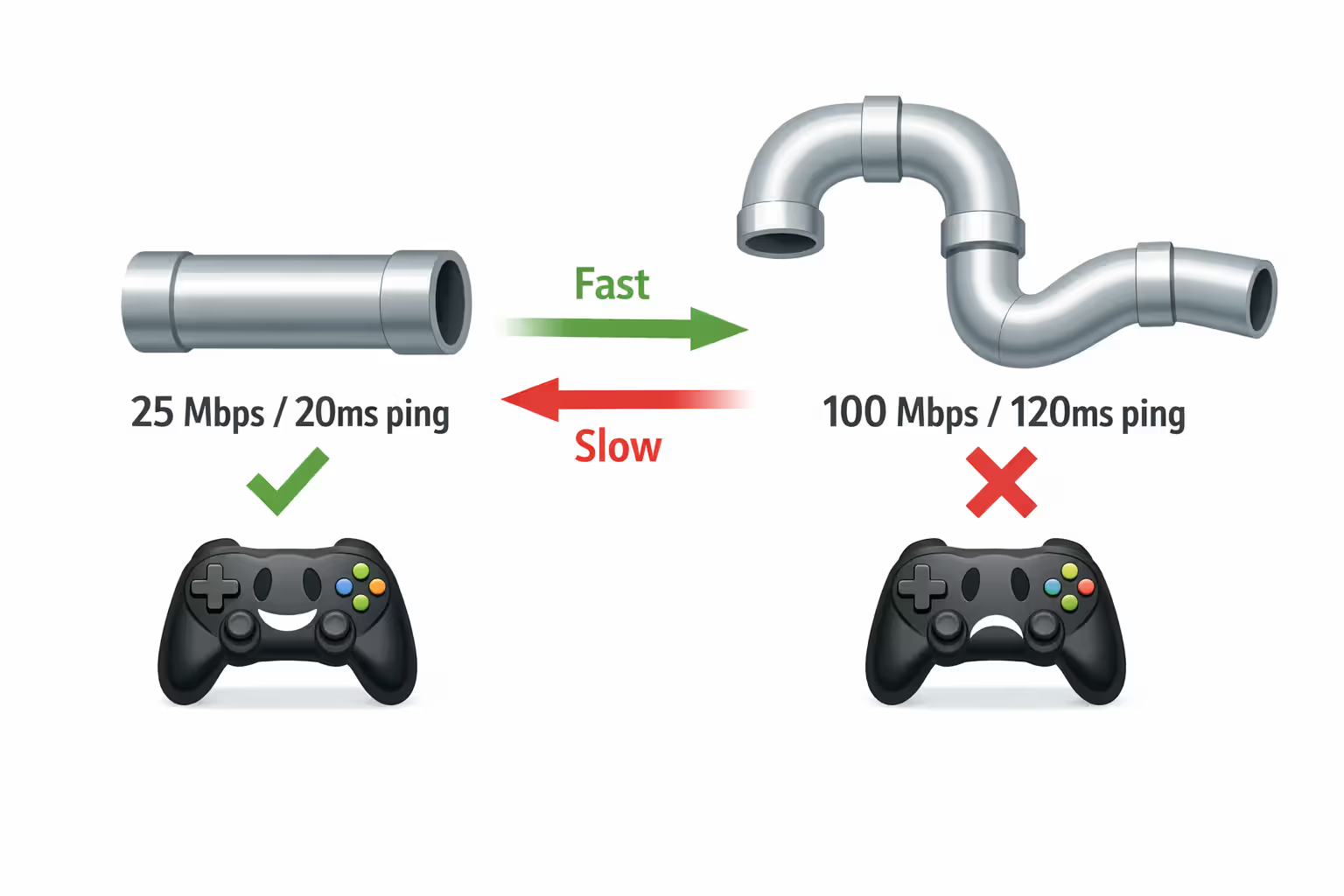
Think of bandwidth like pipe width. More bandwidth? Wider pipe, more water flows through. Latency's the pipe length—how long water takes traveling from start to finish. Gaming cares way more about pipe length than width.
Ping measures round-trip time in milliseconds. You press W to move forward. That command travels to the server. Server processes it. Response travels back. That full loop is your ping. At 20ms? Feels instant. At 150ms? Noticeable delay. At 300ms? Unplayable.
I've tested this repeatedly: 100 Mbps with 120ms ping feels worse than 25 Mbps with 20ms ping. The slower connection responds faster. Your actions register immediately. Enemies appear where they actually are instead of where they were 120 milliseconds ago.
That's why some fiber connections disappoint—ISPs route traffic inefficiently, adding 40-60ms compared to competitors. You're paying for speed but getting lag because packets take the scenic route.
Character teleporting around? Opponents skipping across your screen? Shots not registering? Check ping first. Download speed only matters when you're maxing out bandwidth running multiple activities simultaneously.
Author: Caroline Prescott;
Source: flexstarsolutions.com
What Ping Rates Let You Actually Compete
Competitive shooters need sub-30ms. Period. Higher latency means opponents with better connections see and shoot you before your screen updates. Esports tournaments wire players directly to local servers—some achieve single-digit ping for perfectly synchronized gameplay.
Fighting games demand even tighter windows. 20ms or lower. Frame-perfect combos don't work with lag. Why the FGC (fighting game community) still heavily prefers local tournaments over online.
Casual gaming handles 80-100ms fine. Turn-based games, strategy titles, most MMORPGs build in enough buffer that moderate ping doesn't wreck enjoyment. You'll notice slight sluggishness, but everything functions.
Cloud gaming adds unavoidable latency since you're streaming rendered video instead of transmitting game data. Even perfect internet adds 30-80ms for encoding, transmission, and decoding. Xbox Cloud Gaming or GeForce Now need sub-40ms baseline ping to keep total latency under 100ms (barely playable).
How Jitter Wrecks Games Even With Good Ping
Jitter measures consistency—variation between individual ping measurements. Steady 60ms? Gameplay feels smooth. Ping bouncing between 30ms and 120ms? Stuttering, rubber-banding, unpredictable timing.
Network congestion creates most jitter. Your ISP's infrastructure overloads during evening hours. Data packets queue waiting for transmission. Some pass immediately, others wait, creating wild swings. Wi-Fi interference makes this worse—competing signals force retransmissions with random delays.
Target under 10ms jitter for competitive play. Under 30ms for casual. Standard speed tests show ping but completely ignore jitter. You need specialized tools like PingPlotter or WinMTR revealing jitter patterns over time.
Gaming routers with QoS (Quality of Service) reduce jitter by prioritizing game traffic. Configure properly and game packets bypass the queue even when other devices saturate your connection.
Upload Speed Requirements Gamers Often Overlook
Everyone obsesses over download speed. Upload gets ignored. Big mistake.
Every action you take—moving, shooting, activating abilities—transmits data upstream to game servers. Voice chat, streaming your gameplay, video calls during gaming—all need consistent upload bandwidth.
Most online games need 0.5-1 Mbps upload for basic gameplay. Character position updates, actions, game state sync. Simple stuff. But asymmetric plans (common with cable) provide 10-20x more download than upload. That imbalance bites you.
Voice chat through Discord, Xbox Live, or PlayStation Network adds 0.5-1 Mbps per channel. Streaming to Twitch at 720p/30fps? Needs 3-5 Mbps upload. Bump to 1080p/60fps and you're at 6-8 Mbps. Suddenly your 300 Mbps download / 10 Mbps upload cable plan shows its weakness—can't game, talk, and stream simultaneously without degradation.
Content creators need different math entirely. Start at 10 Mbps upload minimum. 20-35 Mbps for professional quality. This is why streamers love fiber—1,000 Mbps down, 1,000 Mbps up provides unlimited overhead.
Video conferencing compounds the problem. Zoom call at HD quality? 3-4 Mbps upload. Parent working from home while kid's gaming creates upload congestion on typical cable plans. Result: everyone experiences degraded quality, nobody understands why since download speed looks fine on speed tests.
Upload saturation also spikes latency dramatically. When upload bandwidth hits capacity, outgoing game packets queue behind other traffic, adding 50-200ms delay. Explains those sudden lag spikes when someone starts uploading photos—your game suffers despite plenty of download bandwidth sitting unused.
Author: Caroline Prescott;
Source: flexstarsolutions.com
Console Gaming vs. PC Gaming: Do Speed Needs Differ?
Platform affects speed needs less than you'd think. Usage patterns create the real differences.
Console requirements mirror PC for equivalent games. Call of Duty on PlayStation uses identical bandwidth to Call of Duty on PC—both transmit the same data to the same servers. Microsoft recommends 3 Mbps for Xbox. Sony suggests 3-5 Mbps for PlayStation. Nintendo targets 3 Mbps for Switch.
Those baseline numbers work purely for gaming but ignore reality. Downloading updates, streaming apps, party chat, cloud saves—all consume bandwidth. Realistically? Plan for 25-50 Mbps for smooth console experiences with normal usage.
PC gaming hits the same baseline requirements but higher practical needs. PC gamers update graphics drivers constantly, download mods, join beta programs, run more background apps. Steam, Epic, Xbox PC perpetually update game libraries. Typical gaming PC downloads 50-200 GB monthly just in patches and updates.
Switch operates differently due to hybrid portable/home design. Many users rely exclusively on Wi-Fi. The Switch's older wireless hardware struggles with interference. Splatoon and Smash Bros show noticeable performance hits on Wi-Fi despite adequate speeds. Switch also uses peer-to-peer connections for numerous games instead of dedicated servers, making upload bandwidth critical.
Cloud gaming fundamentally transforms requirements. Xbox Cloud Gaming, GeForce Now, Amazon Luna, PlayStation Plus Premium stream rendered video rather than just game data. Changes the paradigm from low-bandwidth/low-latency to high-bandwidth/low-latency.
Xbox Cloud Gaming needs 10-20 Mbps for 1080p streaming. Microsoft recommends 20 Mbps for consistency. GeForce Now wants 15-25 Mbps for 1080p/60fps, jumping to 35-50 Mbps for 4K. These platforms also demand sub-60ms ping—ideally sub-40ms—to maintain acceptable input lag.
Most gamers wildly overestimate bandwidth needs while completely underestimating latency importance. I see constant support tickets from users with 500 Mbps connections experiencing terrible lag because their ISP routes traffic through inefficient pathways, adding 40-60ms versus competing providers. For online gaming specifically, where your data travels matters as much as how fast it gets there. We've documented cases where 50 Mbps fiber with optimized routing outperforms 1 Gbps cable suffering poor peering agreements
— Marcus Chen
This highlights critical reality: ISP quality beats raw speed. Some providers invest heavily in gaming-optimized infrastructure—direct connections to major game servers and content delivery networks. Others route everything through congested backbones regardless of destination. Two identical speed plans deliver vastly different gaming experiences based on these infrastructure choices.
How to Fix Packet Loss and Connection Drops During Games
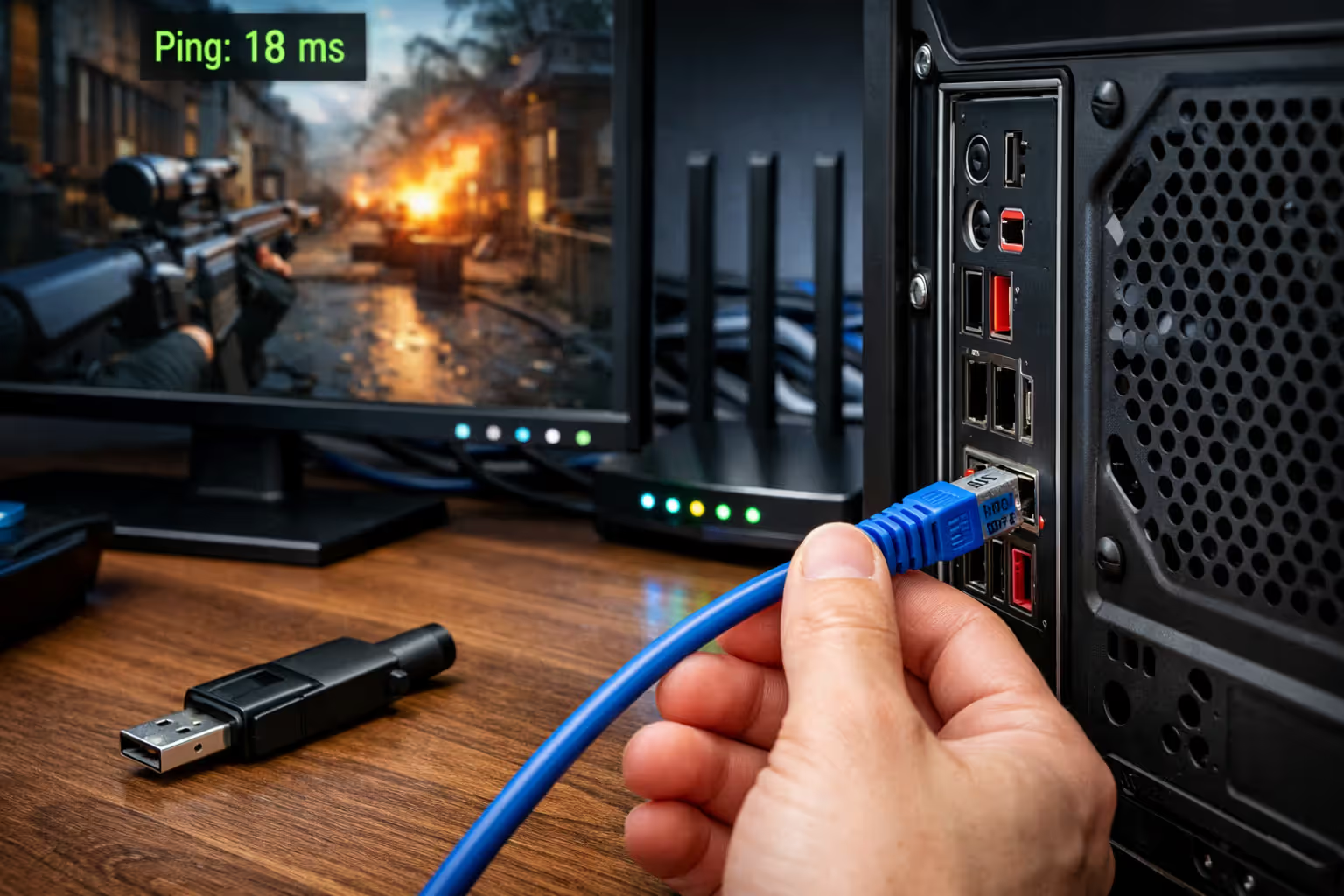
Packet loss appears as teleporting characters, shots that don't register, sudden disconnections. Unlike lag (which delays information), packet loss means data never arrives. Game server or your client must request retransmission, creating noticeable gaps.
Even 1-2% packet loss severely disrupts gaming. 5% makes most titles unplayable. Yet packet loss doesn't show on basic speed tests—your connection displays 100 Mbps with perfect ping while 3% of packets vanish, creating constant stuttering.
Wi-Fi causes most packet loss in home networks. Wireless signals fight neighbors' routers, microwave ovens, baby monitors, Bluetooth devices. Walls, floors, metal objects block signals. The 2.4 GHz band suffers worst—overcrowded and slow. The 5 GHz band offers better speeds but reduced range, struggles penetrating walls.
Switch to wired Ethernet. Eliminates most Wi-Fi packet loss immediately. Cat5e or Cat6 cables reliably support gigabit speeds. Powerline adapters work when running cables isn't practical, though quality varies wildly based on your home's electrical wiring.
Can't go wired? Optimize Wi-Fi aggressively. Position router centrally, elevated, with clear line-of-sight to gaming devices. Use 5 GHz exclusively for gaming. Change Wi-Fi channel to avoid neighbor interference—most routers default to channels 1, 6, or 11, creating massive congestion. Tools like WiFi Analyzer identify clearer channels.
Router age and quality matter enormously. Budget routers from 2015 can't handle modern device counts and traffic volumes. Their processors choke on multiple simultaneous connections, creating bottlenecks and dropped packets. Gaming routers with better processors, more memory, and QoS capabilities maintain stability under heavy load.
ISP-side packet loss needs different approaches. Run extended ping tests to your ISP's gateway and beyond. Packet loss reaching the gateway indicates problems with ISP infrastructure—damaged cables, overloaded network nodes, failing equipment. Document issues with timestamps and traceroute data, then contact support. Persistent ISP packet loss usually requires technician visits to replace cables or equipment.
Some ISPs throttle gaming traffic during peak hours, particularly on budget plans. Creates artificial packet loss and latency spikes. VPNs occasionally bypass throttling by encrypting traffic so ISPs can't identify and deprioritize it, though VPNs add their own latency. Works diagnostically—if VPN gaming performs better, throttling's happening.
Cable modem and router placement affects signal quality. Modems near electrical panels, fluorescent lights, or heavy appliances experience interference. Loose coaxial connections degrade signals. Verify all cables are hand-tight and undamaged.
Bufferbloat causes symptoms mimicking packet loss without actual data loss. When your router's buffer overfills with queued traffic, new packets wait excessively, creating lag spikes feeling like packet loss. Modern routers featuring SQM (Smart Queue Management) resolve this by managing buffer sizes intelligently.
Author: Caroline Prescott;
Source: flexstarsolutions.com
Testing Your Current Setup: Is Your Internet Actually Gaming-Ready?
Standard speed tests from Ookla, Fast.com, or ISP tools measure bandwidth while missing gaming metrics. They reveal pipe width, not gaming performance.
Start with conventional speed tests establishing baseline. Run tests at different times—morning, afternoon, evening, late night. ISP performance frequently tanks during peak evening windows when everyone streams video. If your 200 Mbps connection drops to 50 Mbps at 8 PM, you've identified congestion.
Test from multiple devices and locations. Wired desktop shows your connection's true potential. Wi-Fi tests reveal wireless degradation. Compare results identifying weak points.
Ping testing reveals latency characteristics mattering far more than speed. Ping game servers directly instead of generic speed test servers. Most games display server lists with ping times. Alternatively, ping major gaming server locations manually—ping 8.8.8.8 targets Google's DNS, or find IPs for game-specific servers.
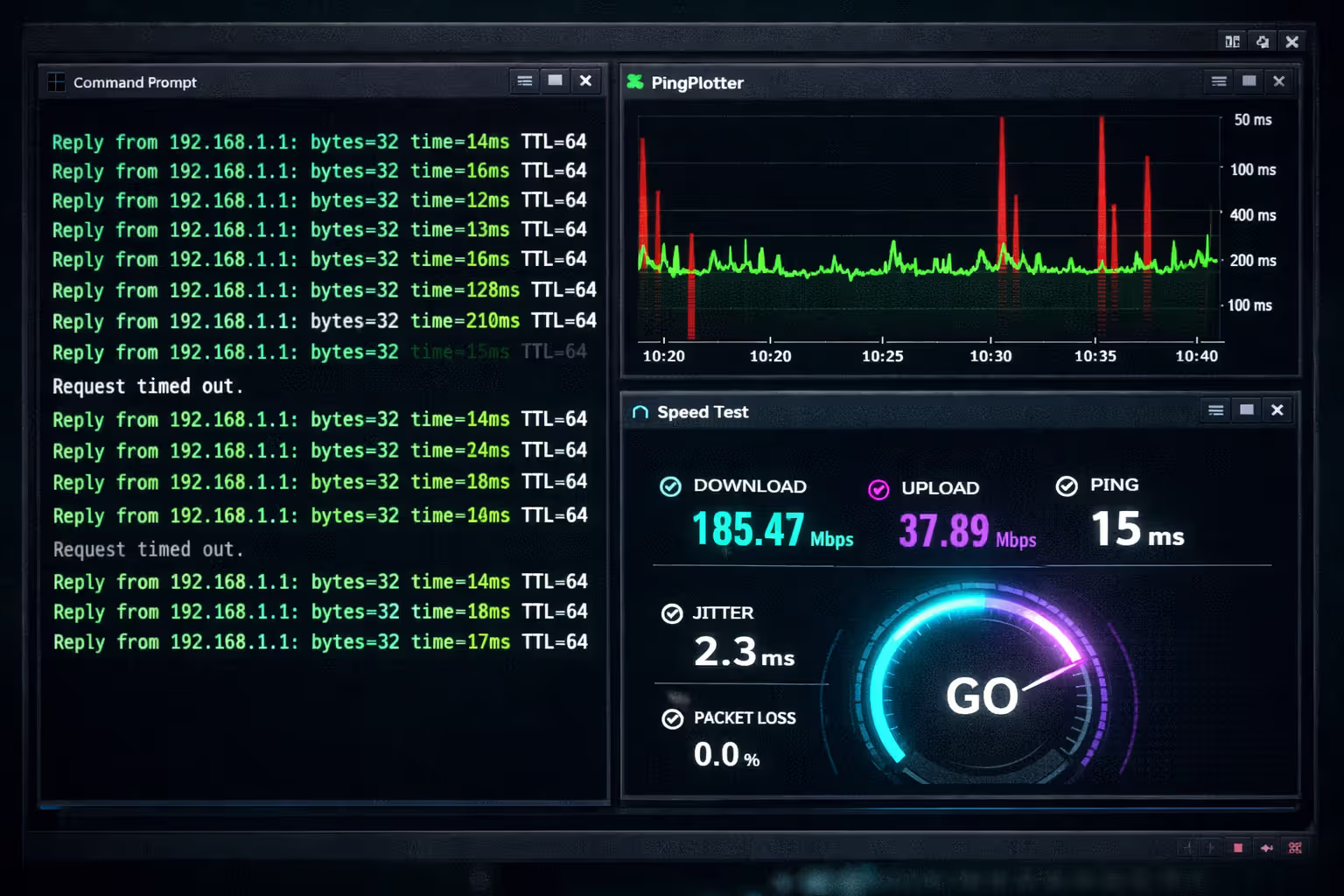
Run extended ping tests identifying jitter and stability. Open Command Prompt (Windows) or Terminal (Mac), execute: ping -t google.com (Windows) or ping google.com (Mac). Let this run 10-15 minutes during typical gaming hours. Watch for spikes and variation. Consistent 30-40ms is excellent. Fluctuation from 30ms to 150ms indicates jitter problems.
PingPlotter and WinMTR provide visual jitter analysis over time. They graph ping variations and identify where latency spikes originate—your router, your ISP, or game servers themselves. This diagnostic data pinpoints problems accurately.
Packet loss testing requires specialized tools. PingPlotter measures loss automatically during extended tests. Online tools like PacketLossTest.com provide quick assessments. Test multiple destinations—packet loss to one server might indicate that server's issues rather than your connection.
Bufferbloat testing uses Waveform's Bufferbloat Test or DSLReports Speed Test. These measure latency under load—how much ping increases when connection saturates. Quality connections add under 30ms under load. Poor connections spike 200-500ms, causing severe lag during downloads or when other devices consume bandwidth.
Test during actual gaming sessions capturing real-world performance. Run packet capture tools like Wireshark while gaming observing actual data transmission patterns. This advanced technique reveals whether your connection delivers consistent performance under gaming loads.
Compare wired versus wireless. If wired gaming runs smooth but wireless stutters, your Wi-Fi needs optimization. If both struggle, the problem's your ISP or internet plan.
Document everything methodically. Screenshot speed tests, save ping results, record specific times problems occur. This evidence helps when contacting your ISP or deciding whether upgrades are necessary.
Author: Caroline Prescott;
Source: flexstarsolutions.com
FAQ: Common Questions About Gaming Internet Speed
Picking internet service for gaming means looking beyond that big speed number plastered across advertisements. A 300 Mbps plan suffering 150ms ping and 5% packet loss performs worse than 50 Mbps delivering 30ms ping with stable connections. Prioritize low latency, consistent performance, adequate upload over raw download speed.
For most gamers, 50-100 Mbps with sub-50ms ping handles everything comfortably—competitive gaming, voice communication, simultaneous streaming. Content creators and multi-gamer households benefit from 100-300 Mbps with 10-35 Mbps upload. Beyond 300 Mbps, gaming performance doesn't improve unless you're constantly downloading massive game libraries.
Test your current connection thoroughly before upgrading. Many perceived speed problems actually originate from Wi-Fi issues, router limitations, or ISP routing inefficiencies. A $50 router upgrade or switch to wired Ethernet frequently solves problems that superficially appear as bandwidth limitations.
When shopping for service, research ISP gaming performance specifically in your geographic area. Online communities, local forums, gaming subreddits provide real-world experiences beyond marketing claims. Some ISPs invest heavily in gaming infrastructure while others deprioritize gaming traffic. This infrastructure quality affects your experience more than speed tier differences.
Best internet for gaming balances speed, latency, reliability, and cost effectively. Identify your actual needs based on household size, gaming style, simultaneous activities, then select the plan meeting those requirements without overpaying for unused capacity.