
Modern open-plan office with multiple workstations, monitors, VoIP phones, ceiling WiFi access points with signal waves, and a video conference on one screen
What Internet Speed for Business Do You Need?

Content
Choosing the right internet speed for your business isn't about picking the cheapest plan or matching what worked at your last office. A dental practice running appointment software and occasional video calls needs vastly different bandwidth than a marketing agency uploading client videos daily. Get it wrong, and you'll face dropped calls during client presentations, frozen point-of-sale terminals during checkout rushes, and employees complaining that "the internet is slow again."
The baseline answer: most small businesses need at least 25 Mbps download and 10 Mbps upload per five employees, but that's just a starting point. Your actual requirements depend on which applications you run simultaneously, how many devices connect to your network, and whether you're backing up data to the cloud or hosting your own servers.
How to Calculate Your Business Bandwidth Needs
Start by auditing what's actually happening on your network during peak hours. Walk through your office at 10 a.m. on a Tuesday and count how many employees are on video calls, how many are uploading files, and whether anyone is running bandwidth-heavy applications like CAD software or video editing tools.
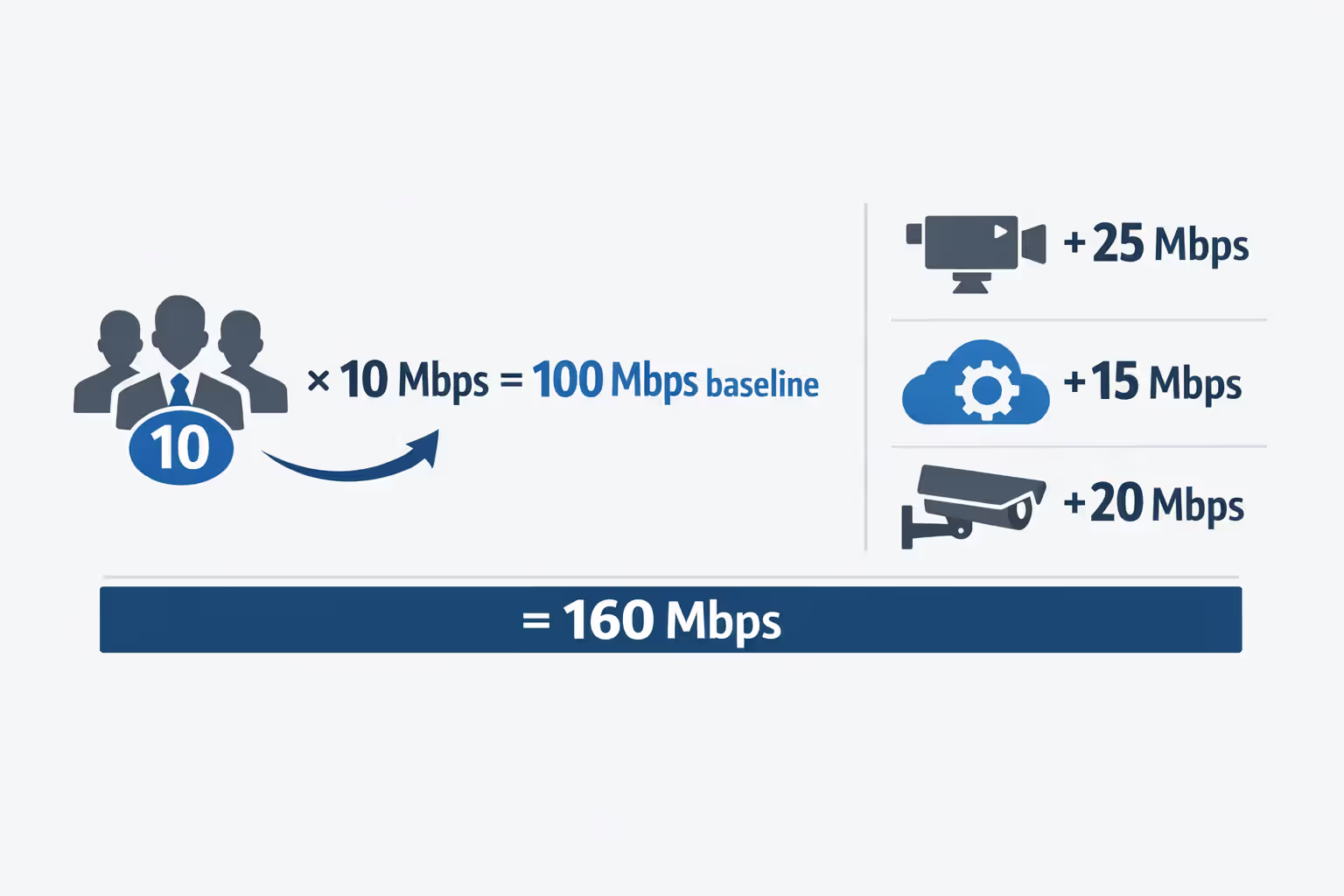
Here's a practical framework: multiply your employee count by 10 Mbps as a baseline, then add bandwidth for specific applications. A ten-person office would start at 100 Mbps, then add 25 Mbps if three people regularly join video conferences, another 15 Mbps for cloud-based accounting software with multiple simultaneous users, and 20 Mbps if you're running security cameras that upload footage to the cloud.
Don't forget to factor in growth. If you're planning to hire five more people in the next 18 months, or if you're considering moving your server infrastructure to the cloud, build that into your calculation now. Upgrading mid-contract often means paying early termination fees or waiting months for installation appointments.
The "concurrent usage" factor matters more than total employee count. A construction company with 20 employees might only have five people in the office at once, while a call center with the same headcount has everyone online simultaneously. Track your actual usage patterns for a week before committing to a plan.
Author: Tyler Beaumont;
Source: flexstarsolutions.com
Minimum Internet Speeds for Common Business Applications
Different business tools consume bandwidth at wildly different rates. Email and basic web browsing barely register, while video conferencing and cloud backups can saturate even robust connections.
VoIP and Video Conferencing Requirements
A single VoIP call needs roughly 100 Kbps (0.1 Mbps) of bandwidth in both directions, but that's the bare minimum. For clear audio without dropouts, plan for 150 Kbps per line. A company with five employees who might all be on calls simultaneously needs at least 1 Mbps dedicated to voice traffic.
Video conferencing demands significantly more. Standard definition video calls require 1-2 Mbps per participant, while HD video jumps to 3-4 Mbps. If your team hosts client presentations over Zoom with screen sharing and multiple participants, budget 5 Mbps per active call. A marketing team running three simultaneous client calls in HD could consume 15 Mbps just for video conferencing.
The catch with VoIP bandwidth requirements: you need consistent speeds, not just average speeds. A connection that delivers 50 Mbps most of the time but drops to 5 Mbps during peak hours will cause choppy calls and frustrated clients.
Cloud Software and File Sharing
Modern businesses run on cloud applications—Salesforce, QuickBooks Online, Microsoft 365, Google Workspace. Each active user typically needs 2-5 Mbps for smooth performance. The problem compounds when multiple employees sync large files simultaneously through Dropbox or OneDrive.
A real-world example: an accounting firm with eight employees all accessing QuickBooks Online needs about 25 Mbps just for that application during month-end close when everyone's pulling reports and entering transactions. Add email, web research, and the occasional file download, and you're quickly approaching 50 Mbps.
File sharing creates unpredictable spikes. When an employee uploads a 500 MB presentation to SharePoint, that can monopolize your upload bandwidth for several minutes. With insufficient upload speed (we'll cover this shortly), that one upload slows everyone else's cloud applications.
Point-of-Sale and Payment Processing Systems
POS systems need surprisingly little bandwidth—typically 1-2 Mbps per terminal—but they demand extreme reliability. A dropped connection during a transaction can mean lost sales, confused customers, and reconciliation headaches at day's end.
Retail businesses should never operate POS systems on the same network as guest WiFi or employee personal devices. Even with adequate total bandwidth, a customer streaming video on your guest network shouldn't be able to slow down checkout lanes.
Cloud-based POS systems like Square or Clover require constant connectivity. If your internet goes down, some systems switch to offline mode but with limited functionality. You might be able to process credit cards but not look up customer purchase history or apply complex discounts.
| Application Type | Minimum Speed per User | Recommended Speed per User | Upload Speed Importance |
| Email & web browsing | 1 Mbps | 2-3 Mbps | Low |
| VoIP calls | 0.5 Mbps | 1 Mbps | Critical (symmetrical) |
| Video conferencing | 2 Mbps | 4-5 Mbps | Critical (symmetrical) |
| Cloud apps (CRM/accounting) | 2 Mbps | 5 Mbps | High |
| File uploads/backups | 5 Mbps | 10+ Mbps | Critical |
| POS transactions | 1 Mbps | 2 Mbps | Medium |
| Remote desktop | 3 Mbps | 5 Mbps | High |
Why Upload Speed Matters More Than Most Businesses Realize
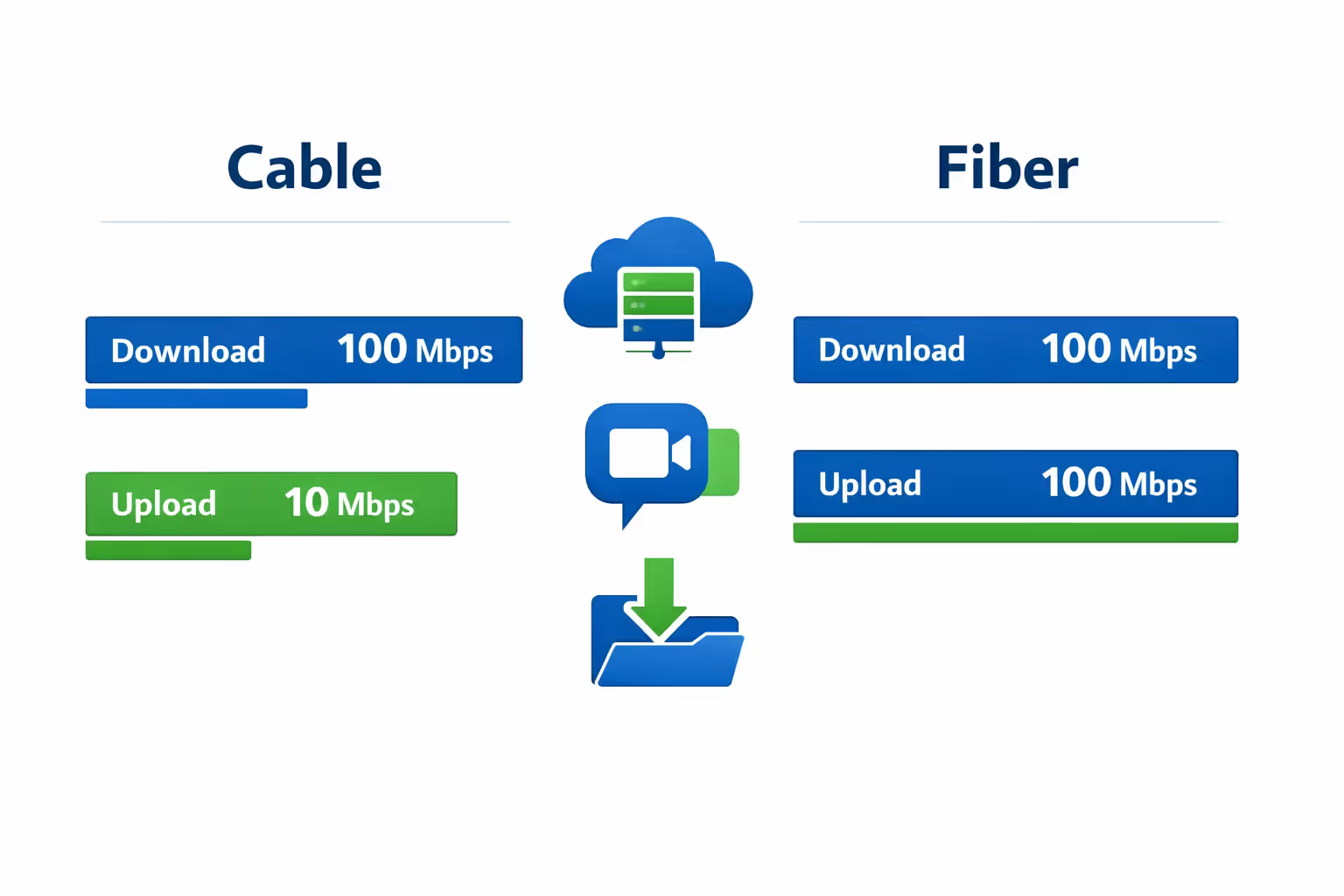
Most internet plans advertise download speeds prominently—"100 Mbps!" or "500 Mbps!"—while burying upload speeds in the fine print. That 100 Mbps cable connection often comes with just 10 Mbps upload, creating a critical bottleneck for modern businesses.
The asymmetry exists because residential users primarily download content—streaming Netflix, browsing websites, downloading files. But businesses upload constantly: sending emails with attachments, backing up data to cloud storage, sharing screens during video calls, and syncing files to collaboration platforms.
Consider a common scenario: your office has 100 Mbps download and 10 Mbps upload. Download speed feels fine—web pages load quickly, cloud applications respond promptly. Then an employee starts uploading a 2 GB video file to Google Drive. That upload will take roughly 27 minutes and consume most of your upload bandwidth. During those 27 minutes, everyone else experiences sluggish performance because their cloud applications and video calls compete for the remaining upload capacity.
Business upload speed becomes critical for several activities:
Cloud backups: Automated backup systems typically run during business hours, continuously syncing changed files. A company backing up 50 GB of data daily needs substantial upload bandwidth to avoid multi-hour backup windows that impact daytime performance.
Video calls: While you download video from other participants, you're simultaneously uploading your own video and audio feed. With insufficient upload speed, your video appears choppy or frozen to other meeting participants, even if you're seeing them clearly.
Remote access: Employees accessing office computers via Remote Desktop or VPN need strong upload speeds from the office connection. If your field technicians remotely access office systems to pull customer data, slow upload speeds create frustrating delays.
File sharing: When a designer sends a 300 MB project file to a client, that file must upload before it can be shared. With 10 Mbps upload, that's a four-minute wait. With 100 Mbps symmetrical upload, it's done in 24 seconds.
Fiber internet connections typically offer symmetrical speeds—100 Mbps down and 100 Mbps up—while cable and DSL connections are asymmetrical. For businesses heavily dependent on cloud services, the upload speed advantage of fiber often justifies the higher cost.
Author: Tyler Beaumont;
Source: flexstarsolutions.com
Small Business Internet Speed Recommendations by Office Size
Here are practical speed ranges based on employee count and typical usage patterns. These assume standard business applications—email, web browsing, cloud software, occasional video calls—not specialized high-bandwidth activities like video production or large-scale data processing.
1-5 employees: 50-100 Mbps download, 10-25 Mbps upload. This handles basic operations comfortably. Choose the higher end if multiple employees frequently join video conferences or if you're running cloud-based phone systems. A solo consultant might function adequately on 25 Mbps, but that leaves no headroom for growth or multiple simultaneous activities.
6-15 employees: 100-200 Mbps download, 25-50 Mbps upload. At this size, you're likely running multiple cloud applications, hosting regular video meetings, and dealing with file sharing across teams. Internet for office WiFi becomes more complex with a dozen devices competing for bandwidth. Consider 200 Mbps if your industry involves large file transfers—architecture, marketing, engineering.
16-30 employees: 200-400 Mbps download, 50-100 Mbps upload. You're approaching the threshold where internet reliability matters as much as speed. A single connection failure impacts dozens of employees. This is when businesses should seriously consider redundant connections or business-class service with meaningful uptime guarantees.
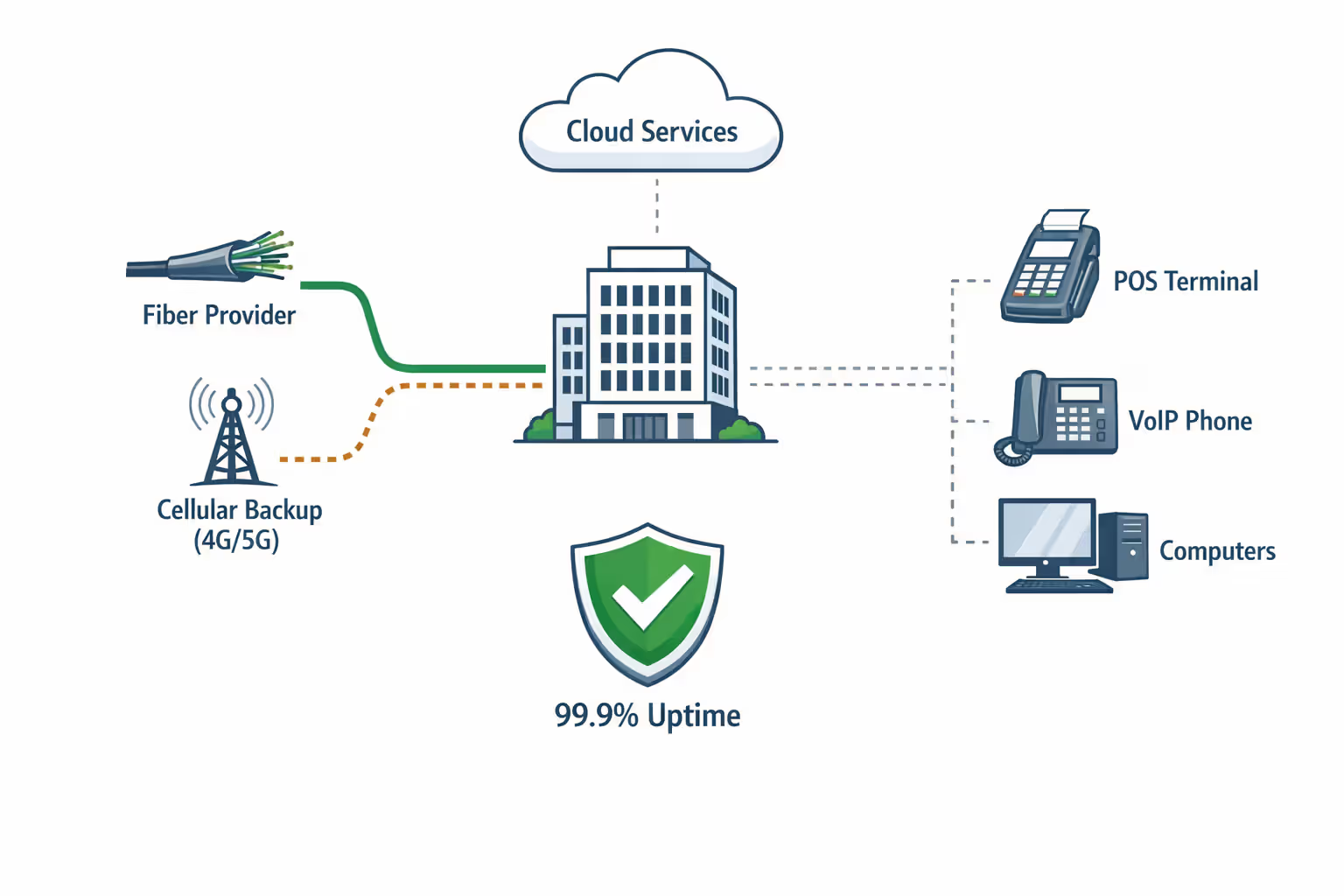
30+ employees: 400+ Mbps download, 100+ Mbps upload, likely with redundant connections. At this scale, internet becomes critical infrastructure. Many businesses implement dual connections from different providers—perhaps fiber as primary and cable as backup—with automatic failover if the primary connection drops.
These ranges assume you're not running bandwidth-intensive specialized applications. A video production company with 10 employees might need 500 Mbps or more, while a law firm with 20 employees doing primarily document work might function well on 150 Mbps.

Author: Tyler Beaumont;
Source: flexstarsolutions.com
Scalability considerations: upgrading internet mid-contract is expensive and disruptive. Installation appointments can take weeks, especially for fiber connections requiring new infrastructure. When choosing a plan, think about where your business will be in two years, not just today's needs.
What to Look for Beyond Speed: Reliability and Service Level Agreements
A 500 Mbps connection that goes down twice a month is worse than a 200 Mbps connection with 99.9% uptime. For businesses where internet downtime directly impacts revenue—retail stores, call centers, online service providers—reliable business internet trumps raw speed.
Service Level Agreements (SLAs) define what you can expect from your provider and what compensation you receive when they fail to deliver. Business internet SLA basics include uptime guarantees, repair time commitments, and performance standards.
A typical business-class SLA might guarantee 99.5% uptime (roughly 3.6 hours of downtime per month) with four-hour repair response times. Premium SLAs offer 99.9% uptime (43 minutes per month) and two-hour responses. Consumer internet plans typically offer no SLA whatsoever—your connection is down until the provider gets around to fixing it, which might be days during busy periods.
The difference between business and residential internet extends beyond SLAs:
Support priority: Business customers get dedicated support lines with shorter wait times and technicians who understand business applications. When your POS system is down and customers are waiting, you can't spend 45 minutes on hold navigating residential support menus.
Static IP addresses: Many businesses need static IPs for remote access, hosting services, or security camera systems. Residential plans typically provide dynamic IPs that change periodically.
No throttling or caps: Business plans don't throttle speeds during "peak hours" or impose monthly data caps. Residential plans increasingly limit heavy users or slow speeds after certain thresholds.
Contract terms: Business contracts often run 1-3 years with early termination fees, but they lock in pricing and service levels. Residential pricing can increase with little notice.
Consider backup connections for critical operations. A restaurant running cloud-based POS systems might maintain a secondary cellular internet connection that automatically activates if the primary connection fails. The backup might be slower and more expensive per gigabyte, but it prevents the catastrophic scenario where you can't process payments during dinner rush.
Most small businesses underestimate their bandwidth needs by 30-40% and don't discover the problem until they're already locked into a contract. The cost of inadequate internet—lost productivity, failed client calls, employee frustration—far exceeds the price difference between adequate and optimal service. I always recommend businesses calculate their needs, then add 25% headroom for growth and unexpected usage spikes
— Michael Torres
Common Mistakes When Choosing Business Internet Plans
Treating WiFi capacity as unlimited: Your internet connection might deliver 300 Mbps, but your wireless router might only handle 20-30 simultaneous devices effectively. Businesses often upgrade internet speed without upgrading network hardware, then wonder why performance hasn't improved. A modern office needs business-grade access points, not the consumer router that came free with your internet plan.
Focusing exclusively on download speed: We've covered this, but it bears repeating: that 400 Mbps cable plan with 20 Mbps upload will frustrate any business using cloud services heavily. Always check upload speeds before signing contracts.
Choosing consumer-grade service to save money: The $50/month residential plan might seem attractive compared to $150/month business service, but you're sacrificing SLAs, support quality, and reliability. When internet downtime costs your business $200/hour in lost productivity, the $100 monthly savings becomes expensive.
Not planning for growth: You're signing a three-year contract. Will your current speed suffice when you've hired five more employees and moved your file server to the cloud? Upgrading mid-contract often means paying installation fees and early termination penalties.
Ignoring contract details: What happens when your "introductory rate" expires in year two? Does your 99.5% uptime guarantee include scheduled maintenance windows? What are the actual repair time commitments? These details matter more than the advertised speed.
Assuming more speed solves all problems: Sometimes slow internet is actually a network configuration issue, malware consuming bandwidth, or a failing router. Before upgrading from 200 Mbps to 500 Mbps, verify that bandwidth is actually your bottleneck. Run speed tests, check router logs, and monitor which applications consume the most data.
Author: Tyler Beaumont;
Source: flexstarsolutions.com
Frequently Asked Questions About Business Internet Speed
Selecting appropriate internet service requires balancing current needs, growth projections, budget constraints, and reliability requirements. A connection that's too slow frustrates employees and hampers productivity, while overpaying for unnecessary bandwidth wastes money better spent elsewhere.
Start with honest assessment: audit your actual usage, count simultaneous users during peak periods, and list bandwidth-intensive applications your business depends on. Calculate minimum requirements using the frameworks outlined here, then add 25% headroom for growth and unexpected usage spikes.
Prioritize upload speed and reliability over raw download numbers. The difference between 300 Mbps and 500 Mbps download rarely impacts daily operations, but the difference between 10 Mbps and 50 Mbps upload transforms how smoothly cloud-dependent businesses function.
Read SLA terms carefully before signing multi-year contracts. Understand what uptime guarantees actually mean, what repair commitments you're receiving, and what happens when the provider fails to meet those commitments. For businesses where internet downtime directly impacts revenue, SLA quality matters more than monthly cost differences.
Finally, remember that internet service is infrastructure, not an expense to minimize. The right connection enables your team to work efficiently, serve customers effectively, and grow without technical constraints. The wrong connection—whether too slow, unreliable, or poorly supported—creates daily friction that compounds into significant productivity losses and missed opportunities.