Secure online fax service interface on a computer monitor in a medical office with stethoscope and document folder on the desk
Secure Internet Fax Guide for HIPAA-Compliant Document Transmission

Content
Medical practices, legal firms, and financial institutions face a common dilemma: how to transmit confidential documents without exposing clients to identity theft, regulatory fines, or reputational damage. Email feels convenient until you realize that a single unencrypted message containing patient data can trigger a six-figure HIPAA penalty. Traditional fax machines seem safer, but they tie you to a physical office and leave paper trails scattered across desks.
Secure internet fax bridges that gap by routing documents over encrypted channels while preserving the legal and compliance advantages of traditional faxing. Unlike standard email, which passes through multiple uncontrolled servers, a properly configured online fax service applies end-to-end encryption, logs every transmission, and signs Business Associate Agreements that shift liability where it belongs.
This guide walks you through the technical safeguards that separate a compliant fax platform from a data breach waiting to happen, the specific HIPAA requirements that trip up most small practices, and the seven encryption features you should verify before signing any contract.
What Makes a Fax Service Truly Secure?
Security starts with encryption, but the devil lives in the implementation details. When a provider advertises "military-grade encryption," ask whether that protection applies during transmission, at rest, or both.
End-to-end encryption means your document is scrambled the moment it leaves your device and remains unreadable until the recipient's system decrypts it. No intermediate server—not even the fax provider's—can view the contents in plain text. This standard is non-negotiable for financial statements, medical records, or legal contracts.
At-rest encryption protects stored documents. If your fax service archives messages for retrieval, those files sit on a disk somewhere. AES-256 encryption ensures that even if an attacker physically steals the hard drive, the data remains gibberish without the decryption keys.
Transport Layer Security (TLS) 1.2 or higher should wrap every connection between your browser or app and the fax server. Older protocols like SSL 3.0 contain known vulnerabilities that hackers exploit in minutes.
An audit trail records who sent what, when, and to which number. Timestamps, IP addresses, delivery confirmations, and access logs create a forensic record that satisfies regulators and helps you reconstruct events during an investigation. Without this paper trail, you have no way to prove compliance when auditors arrive.
Authentication mechanisms—two-factor codes, certificate-based logins, or biometric scans—prevent unauthorized users from hijacking your fax account. A strong password alone won't stop an employee who writes it on a sticky note.

Author: Lindsey Hartwell;
Source: flexstarsolutions.com
HIPAA Compliance Requirements for Online Fax Services
The Health Insurance Portability and Accountability Act sets a high bar for any technology that touches Protected Health Information. If your practice transmits patient records, lab results, or billing statements, your fax provider must meet three core obligations: encryption of PHI in transit and at rest, administrative safeguards that limit access to authorized personnel, and a signed Business Associate Agreement.
What a Business Associate Agreement Actually Covers
A BAA is a legally binding contract that makes the fax vendor responsible for safeguarding PHI under the same rules that govern your practice. The agreement must specify:
- Permitted uses: The vendor may handle PHI only to deliver fax services, not to mine data for advertising or sell contact lists.
- Breach notification: If the provider detects unauthorized access, they must alert you within a defined timeframe—typically 60 days—so you can notify affected patients and the Office for Civil Rights.
- Subcontractor clauses: If the vendor relies on third-party data centers or cloud hosts, those entities also need BAAs in place.
- Termination and data return: When you cancel the service, the provider must either return or destroy all PHI within 30 days.
Many small practices assume that paying for a "HIPAA-compliant" plan automatically satisfies these requirements. It doesn't. The vendor must proactively offer a BAA before you transmit a single patient record. If they refuse or claim it's unnecessary, walk away.
Common HIPAA Violations When Using Non-Compliant Services
The Office for Civil Rights publishes a monthly breach report that reveals recurring mistakes:
- Sending PHI through consumer-grade email without encryption. A clinic forwards a patient's HIV test result via Gmail, which stores the message on Google's servers indefinitely. OCR fined a similar case $100,000.
- Using a fax service that lacks audit logs. During an investigation, you cannot prove when a document was sent or who accessed it. That failure to document is itself a violation.
- Sharing login credentials among staff. HIPAA's Minimum Necessary Rule requires unique user accounts so you can track which medical assistant faxed which chart note.
- Failing to encrypt archived faxes. Your online portal stores five years of patient correspondence in plain text. A server misconfiguration exposes the database to the public internet, triggering mandatory breach notification for thousands of patients.
Each of these scenarios is preventable with a secure online fax service that enforces role-based access, logs every action, and encrypts data end-to-end.

Author: Lindsey Hartwell;
Source: flexstarsolutions.com
Security Gaps That Make Email Riskier Than Encrypted Fax
Standard email was designed in the 1970s to move text files between universities, not to protect Social Security numbers or credit card details. Three structural weaknesses make it unsuitable for sensitive documents:
Lack of default encryption. Most email travels via SMTP, a protocol that sends messages in plain text unless both the sender's and recipient's mail servers support TLS—and even then, the message sits unencrypted in both inboxes. An office manager emails a patient's insurance claim to a billing company. The message hops through four intermediate servers, any of which could be compromised or subpoenaed.
No reliable audit trail. Email headers record routing information, but they don't prove the recipient opened the attachment or that the file wasn't altered in transit. Fax transmission reports, by contrast, include timestamps, page counts, and confirmation codes that hold up in court.
Vulnerability to phishing and account takeover. Attackers send a fake "password reset" link to your billing coordinator. She clicks it, hands over her credentials, and the attacker now has access to every email in her inbox—including years of patient records. Encrypted fax services mitigate this risk with mandatory two-factor authentication and session timeouts.
A healthcare attorney once told me about a small practice that used personal Gmail accounts to exchange patient files with specialists. When Google disabled one doctor's account for suspected spam activity, the practice lost access to three months of correspondence and had no way to prove it had sent referral letters on time. The resulting malpractice claim cost more than a decade of secure fax subscriptions.

Author: Lindsey Hartwell;
Source: flexstarsolutions.com
7 Must-Have Encryption Features When Choosing an E-Fax Provider
Not all vendors deliver the same level of protection. Use this checklist to separate marketing hype from real security:
- TLS 1.2 or 1.3 for all connections. Verify that the provider has disabled older protocols. Check their security documentation or run an SSL Labs scan on their web portal.
- AES-256 encryption at rest. Ask where your faxes are stored—US data centers, European clouds, or offshore servers—and confirm that disks are encrypted with keys managed separately from the data.
- Role-based access controls. You should be able to create accounts for receptionists, nurses, and billing staff, each with permissions tailored to their job. A front-desk clerk doesn't need access to financial reports.
- Multi-factor authentication. Passwords alone are compromised too easily. Require a second factor—SMS code, authenticator app, or hardware token—for every login.
- Comprehensive activity logging. Every send, receive, view, download, and delete should generate a timestamped log entry that includes the user's IP address and device type.
- SOC 2 Type II or ISO 27001 certification. These audits verify that the provider follows documented security policies and undergoes regular third-party testing.
- Configurable retention policies. Some regulations require you to keep records for seven years; others mandate deletion after three. The platform should let you set automatic purge schedules and legal holds.
The table below compares how four hypothetical providers stack up on these criteria.
| Provider | Encryption Standard | BAA Offered | Audit Trail Depth | Data Center Certifications | Starting Price |
| Provider A | TLS 1.3, AES-256 | Yes | Full (send/view/download) | SOC 2, HIPAA | $15/month |
| Provider B | TLS 1.2, AES-128 | Yes | Send/receive only | SOC 2 | $10/month |
| Provider C | TLS 1.2, AES-256 | Upon request | Full (send/view/download) | ISO 27001, HIPAA | $25/month |
| Provider D | TLS 1.1, AES-256 | No | Send only | None listed | $5/month |
Provider D's rock-bottom price is a red flag: outdated TLS, no BAA, and minimal logging mean you're one audit away from a compliance disaster.
How Audit Trails Strengthen Compliance and Accountability
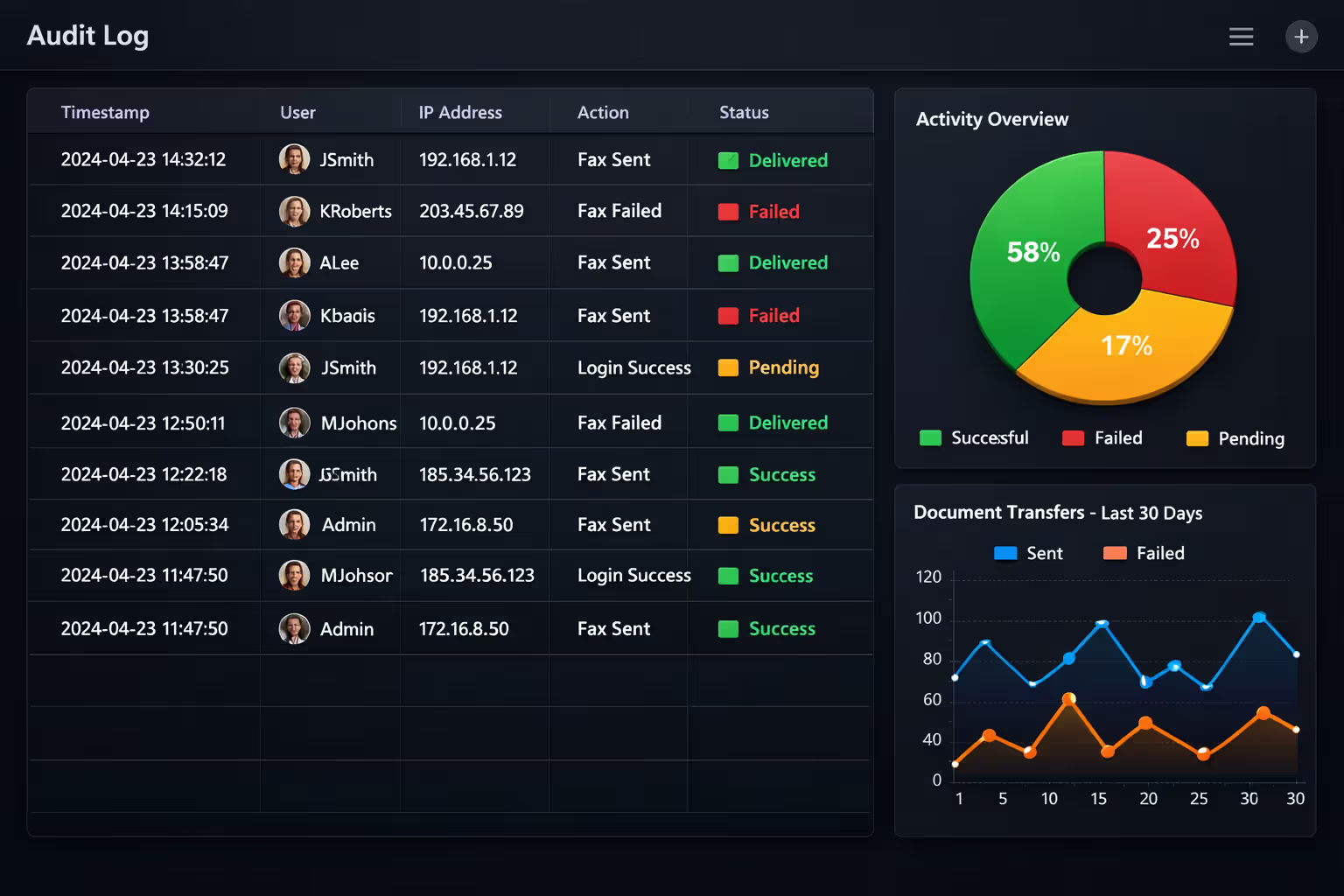
Regulators don't take your word that you followed the rules—they demand proof. An audit trail transforms your fax system into a compliance engine by capturing:
- User identity and authentication method. Did the sender log in with a password, a smart card, or biometrics?
- Document metadata. Filename, page count, file size, and a hash that proves the document wasn't tampered with.
- Transmission details. Source and destination fax numbers, date and time stamps accurate to the second, success or failure codes.
- Access events. Who viewed the fax in the web portal, from which IP address, and whether they downloaded or printed it.
Audit logs are not optional under HIPAA—they're your first line of defense when the OCR comes knocking
— Sarah Mitchell
During a breach investigation, you'll need to produce these logs within days. Store them in a separate, tamper-proof repository with its own access controls. Some organizations export logs to a Security Information and Event Management (SIEM) system that correlates fax activity with firewall alerts, login attempts, and other security events.
Retention periods vary by industry. HIPAA requires six years from the date of creation or last use, whichever is later. Financial services often demand seven years. Set automatic archival rules so logs migrate to long-term storage without manual intervention, and apply legal holds when litigation is reasonably anticipated.
Audit trails also deter insider threats. When employees know that every action is logged and reviewed, they think twice before faxing a celebrity's medical chart to a tabloid or forwarding a competitor's bid to a friend.
Author: Lindsey Hartwell;
Source: flexstarsolutions.com
Pricing Models and Hidden Costs of Secure Fax Services
Vendors package their offerings in three common structures:
Per-page plans charge a few cents for each page sent or received. A solo practitioner who faxes ten pages a month might pay $2, but a busy clinic transmitting 500 pages will see a $50 bill. Overage fees can double your cost if you exceed the included allotment.
Subscription tiers bundle a fixed number of pages—say, 200 inbound and 200 outbound—for a flat monthly rate. Additional pages cost extra, but the predictable base fee simplifies budgeting. Mid-tier plans typically start around $20 per month and include features like multiple user accounts and API access.
Enterprise agreements offer unlimited pages, dedicated account managers, and custom integrations with electronic health records or practice management software. Expect to pay several hundred dollars per month, but the per-user cost drops as your team grows.
Watch for these hidden expenses:
- Storage limits. Basic plans may cap archived faxes at 500 MB. Exceeding that triggers upgrade fees or forces you to delete old records prematurely.
- Premium support. Standard plans often include email-only help with 24-hour response times. Phone support and one-hour SLAs cost extra.
- Number porting. Moving your existing fax number to the new provider might incur a one-time $20–$50 fee.
- API usage. If you integrate the fax service with your CRM or EHR, some vendors charge per API call beyond a monthly quota.
Calculate your average monthly page volume, factor in seasonal spikes—tax season for accountants, open enrollment for benefits administrators—and choose a plan with at least 20 percent headroom. Upgrading mid-month usually means paying for two tiers until the billing cycle resets.
Frequently Asked Questions About Secure Internet Fax
Switching to secure internet fax doesn't just check a compliance box—it reduces your attack surface, streamlines document workflows, and provides the forensic evidence you need when regulators or opposing counsel come calling. Prioritize vendors that offer end-to-end encryption, sign BAAs without negotiation, and maintain third-party security certifications. Compare pricing models against your actual page volume, and test integrations in a sandbox environment before routing live patient data. The upfront effort pays dividends the first time you avoid a breach notification or produce a complete audit trail in response to a subpoena.