

ISP server rack with glowing fiber optic cables connecting to laptop, smartphone and tablet silhouettes, with translucent lock, eye and shield icons overlay on dark blue background
Can My Internet Provider See What Websites I Visit? What to Know

Your internet service provider sits at a unique vantage point in your digital life. Every connection request, every website lookup, every byte of data you send or receive passes through their infrastructure. But the question of what they actually see—and what they do with that information—is more nuanced than most people realize.
The short answer: yes, your ISP knows a significant amount about your online activity. They can see which websites you visit, when you visit them, and how much data you exchange. But the specifics depend on the technologies you use and the protections you have in place.
What Your ISP Can See When You Browse the Internet
When you connect to the internet, your ISP acts as the gateway between your device and the rest of the world. Every packet of data travels through their servers, giving them visibility into multiple layers of your activity.
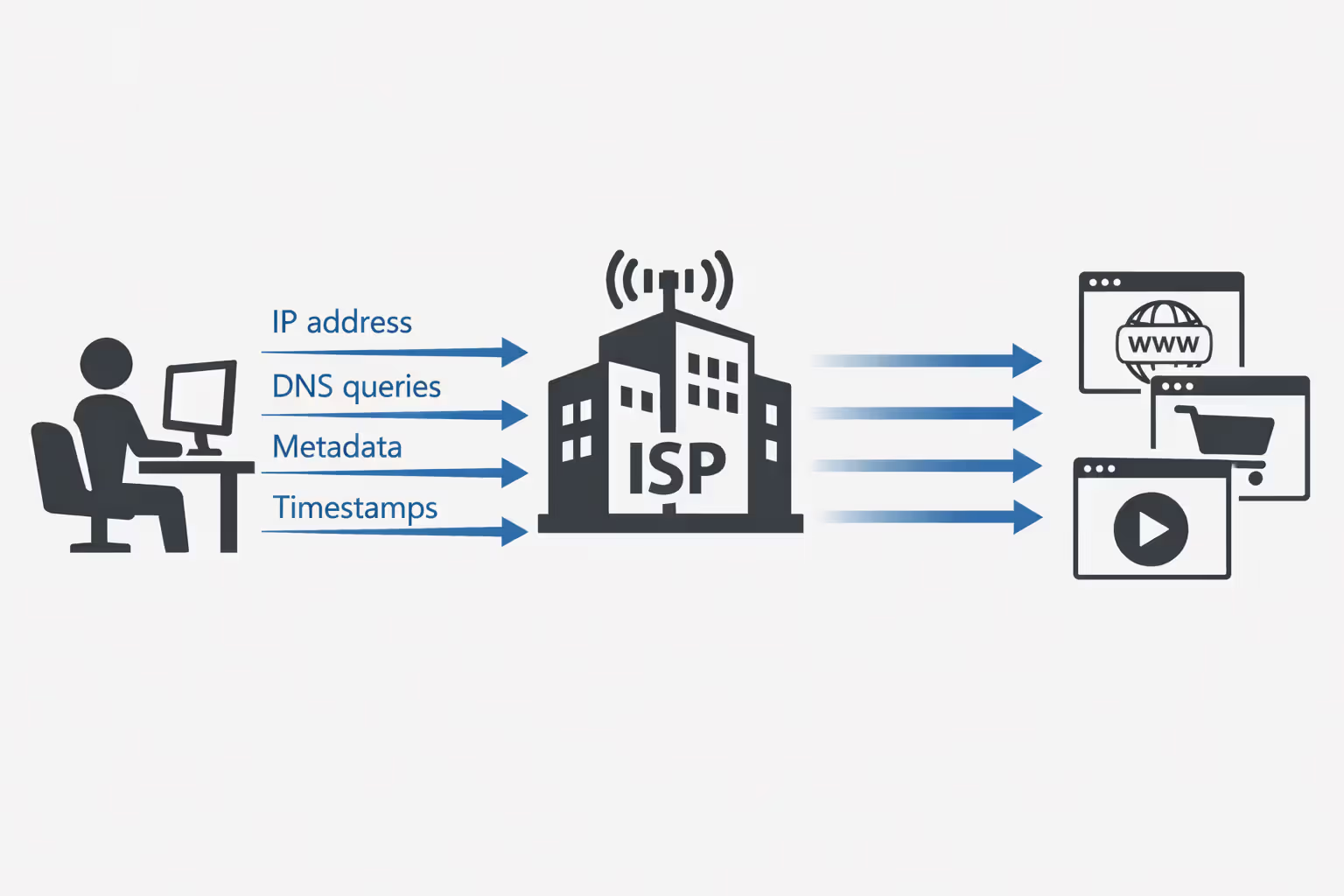
At the most basic level, your ISP can see the IP addresses you connect to. When you visit a website, your device establishes a connection with that site's server, identified by its IP address. Your ISP logs these connections, creating a record of which servers you've contacted and when.
They also see DNS queries—the requests your device makes to translate human-readable domain names (like "example.com") into IP addresses. Unless you've configured alternative DNS settings, your ISP typically handles these lookups by default, giving them a clear list of domain names you're accessing.
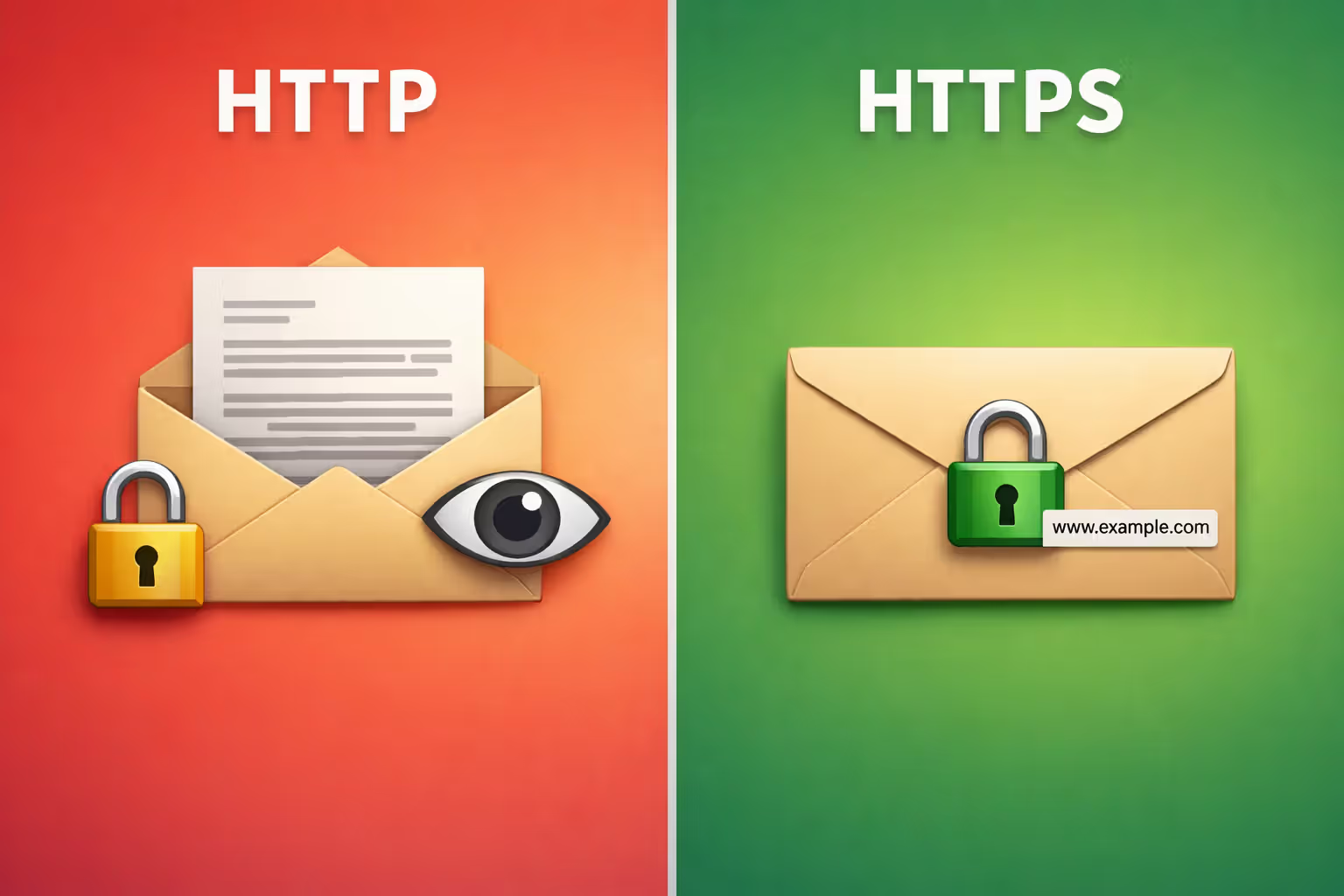
The difference between HTTP and HTTPS matters here, but not as much as you might hope. With unencrypted HTTP connections (increasingly rare but still used on some sites), your ISP can see everything: the full URLs you visit, the content of pages, form submissions, and any data you send or receive. HTTP transmits data in plain text, making it trivially easy for ISPs to read.
HTTPS encrypts the content of your communications, preventing your ISP from reading the actual data exchanged between you and websites. They can't see which specific pages you view on a site, what you type into forms, or the content you download. But they still see substantial metadata: the domain name you're connecting to, the amount of data transferred, the duration of your connection, and the timing of your activity.
This metadata reveals more than you might think. Connection patterns can indicate whether you're streaming video, browsing social media, or downloading large files. The volume and timing of data can suggest your daily routines and habits. And knowing which domains you visit provides a detailed profile of your interests, even without seeing the specific pages.
Author: Marcus Leland;
Source: flexstarsolutions.com
How DNS Requests Reveal Your Browsing Activity to Your ISP
DNS operates like the internet's phone book. Before your browser can connect to a website, it needs to know that site's IP address. Your device sends a DNS query asking "What's the IP address for this domain?" and receives an answer that allows the connection to proceed.
Most people use their ISP's DNS servers by default. This means every time you type a web address or click a link, your ISP receives a request containing that domain name. They log these queries, building a comprehensive list of websites you've accessed.
DNS logging by ISPs is standard practice. They maintain these logs for various periods—sometimes weeks, sometimes months, occasionally years—depending on their policies and legal requirements. These logs include timestamps, allowing them to create a timeline of your browsing activity.
Even if a website uses HTTPS, the initial DNS lookup happens before the encrypted connection is established. Your ISP sees the domain name in plain text. This is one reason why HTTPS alone doesn't provide complete privacy from your ISP.
Some ISPs analyze DNS queries for network management purposes, like blocking malware domains or implementing parental controls. Others use this data for commercial purposes, though practices vary by provider and jurisdiction.
The Difference Between DNS Queries and Full Browsing History
A DNS query tells your ISP you looked up a domain, but not what you did there. If you visit a news site, the DNS query shows you accessed "newssite.com" but doesn't reveal which articles you read or whether you commented on them.
This distinction matters less than it might seem for privacy purposes. Knowing someone visited "dating-site.com" reveals plenty, even without knowing their specific profile views. The domain-level information captured through DNS queries provides substantial insight into interests, habits, and activities.
Full browsing history includes specific URLs and pages. Your ISP can't see this level of detail when you use HTTPS, but they don't necessarily need it to build a profile of your online behavior. The domain-level data from DNS queries often suffices for tracking and targeting purposes.
HTTPS Encryption: What It Hides and What It Doesn't
HTTPS has become the standard for web security, with most major sites now encrypting their connections by default. This encryption protects the content of your communications from interception and reading by third parties, including your ISP.
When you use HTTPS, your ISP cannot see: - The specific pages you view on a website - The content of those pages - What you type into forms (searches, login credentials, messages) - The details of files you upload or download - Cookies or session data
This protection is significant. Your ISP can't read your emails, see your social media posts, or capture your passwords when you use HTTPS-protected sites.
However, HTTPS doesn't hide everything. Your ISP can still see: - The domain names you visit (through DNS queries and SNI) - The IP addresses you connect to - The timing and duration of your connections - The amount of data transferred in each direction - Connection patterns and frequency
Server Name Indication (SNI) is particularly relevant here. When establishing an HTTPS connection, your browser sends the domain name in plain text during the initial handshake. This allows servers hosting multiple sites to present the correct security certificate. But it also means your ISP can see which domain you're accessing, even after the encrypted connection is established.
Encrypted SNI (ESNI) and its successor, Encrypted Client Hello (ECH), aim to solve this problem by encrypting the domain name during the handshake. These technologies are gradually being deployed but aren't yet universally supported.
The metadata visible to your ISP through HTTPS connections remains valuable for profiling and tracking. Knowing someone regularly connects to mental health websites, political forums, or job search sites reveals sensitive information, even without seeing the specific pages viewed.
Author: Marcus Leland;
Source: flexstarsolutions.com
Why ISPs Track Your Internet Activity (And What They Do With It)
ISPs collect and retain data about your internet usage for several reasons, some legitimate and some more controversial.
Network management represents the most straightforward justification. ISPs need to monitor traffic to ensure their networks operate efficiently, identify congestion points, detect technical problems, and plan infrastructure upgrades. This requires visibility into connection patterns and data volumes.
Legal compliance and security also drive data collection. ISPs may be required to retain certain records to comply with law enforcement requests or court orders. They monitor for network abuse, malware distribution, and illegal content sharing. In the US, the Digital Millennium Copyright Act (DMCA) requires ISPs to respond to copyright infringement notices.
Commercial motivations are more contentious. In 2017, Congress repealed FCC privacy rules that would have required ISPs to obtain customer consent before selling browsing data. This opened the door for ISPs to monetize customer information more aggressively.
ISPs can use browsing data for targeted advertising, either serving ads themselves or selling data to advertising networks. They can create customer profiles based on browsing habits and sell these profiles to data brokers. Some ISPs offer "enhanced" services that involve deeper inspection of customer traffic.
The US lacks comprehensive federal privacy legislation governing ISP data practices. Unlike the European Union's GDPR or California's CCPA, there's no nationwide law requiring ISPs to minimize data collection, provide transparency about data use, or obtain meaningful consent before selling customer information.
Different ISPs have different policies. Some are more privacy-respecting than others. But the fundamental reality is that ISPs have both the technical capability and, in many cases, the financial incentive to track and monetize your browsing activity.
Retention periods vary widely. Some ISPs keep DNS logs for a few weeks; others retain them for years. Connection logs might be kept longer than content-related data. Few ISPs provide clear, detailed public information about exactly what they collect and for how long.
Proven Methods to Reduce ISP Tracking
You can't eliminate ISP visibility entirely—they'll always see that you're connected and using data—but you can significantly reduce what they learn about your specific activities.
Using Encrypted DNS Services (DNS-over-HTTPS and DNS-over-TLS)
Switching from your ISP's DNS servers to encrypted DNS services prevents your ISP from seeing your DNS queries. This removes one of their primary methods for tracking which websites you visit.
DNS-over-HTTPS (DoH) and DNS-over-TLS (DoT) encrypt DNS queries, preventing interception and logging by your ISP. Instead of sending queries to your ISP's DNS servers, you send them to a privacy-focused DNS provider over an encrypted connection.
Major browsers now support DoH. Firefox enables it by default in the US, using Cloudflare's 1.1.1.1 service. Chrome allows you to enable DoH in settings. Safari on iOS and macOS supports encrypted DNS profiles.
Popular encrypted DNS providers include Cloudflare (1.1.1.1), Google Public DNS (8.8.8.8), Quad9 (9.9.9.9), and NextDNS. Each has different privacy policies and features. Cloudflare commits to deleting logs within 24 hours; Quad9 doesn't log IP addresses at all.
The trade-off: you're shifting trust from your ISP to your DNS provider. Choose a provider with a strong privacy policy and reputation. Also note that while encrypted DNS hides your queries from your ISP, they can still see the IP addresses you connect to and infer domains from those connections, though this is less precise.
VPNs: How They Block ISP Visibility
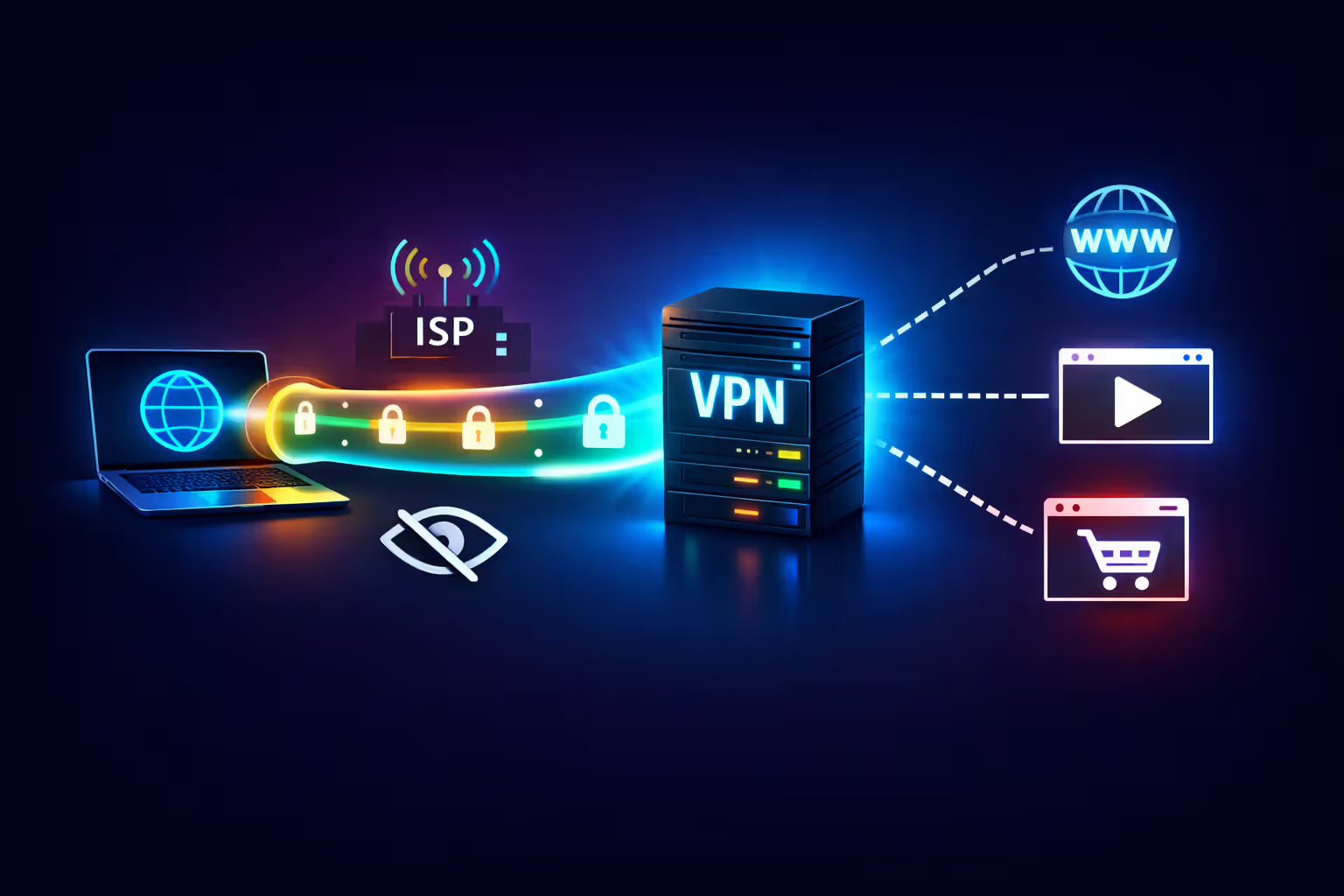
A Virtual Private Network (VPN) creates an encrypted tunnel between your device and the VPN provider's servers. All your internet traffic passes through this tunnel, preventing your ISP from seeing which websites you visit or what you do online.
With a VPN, your ISP can only see: - That you're connected to a VPN server - The IP address of that VPN server - The amount of encrypted data being transferred - The timing of your connection
They cannot see: - Which websites you visit - Your DNS queries (if the VPN includes DNS leak protection) - The content of your communications - The specific services you use
VPNs provide the most comprehensive protection against ISP tracking among practical options available to most users. They're relatively easy to set up and use, with apps available for all major platforms.
Choosing a VPN requires care. You're shifting trust from your ISP to your VPN provider, who now has visibility into your browsing activity. Select a provider with: - A clear no-logs policy (verified by independent audits if possible) - Strong encryption standards - A jurisdiction with favorable privacy laws - DNS leak protection and kill switch features - A good reputation and transparent ownership
Reputable options include Mullvad, ProtonVPN, and IVPN, all of which emphasize privacy and have undergone independent audits. Avoid free VPNs, which often monetize by logging and selling user data—exactly what you're trying to prevent.
VPNs have limitations. They slow your connection somewhat due to encryption overhead. They require trusting a third party. And they don't protect against tracking by websites themselves through cookies, fingerprinting, or account-based tracking.
Author: Marcus Leland;
Source: flexstarsolutions.com
Tor Browser and Other Privacy Tools
Tor (The Onion Router) provides the strongest privacy protection against ISP tracking, though with significant trade-offs in speed and convenience.
Tor routes your traffic through multiple volunteer-operated servers, encrypting it in layers. Your ISP sees that you're using Tor but cannot determine which websites you visit or what you do. Even the Tor network itself doesn't have a complete picture of your activity—no single node knows both your identity and your destination.
The Tor Browser makes using Tor relatively straightforward. It's based on Firefox and includes built-in privacy protections beyond the Tor network itself, like blocking trackers and fingerprinting attempts.
Downsides include significantly slower speeds (due to multiple relay hops), some websites blocking Tor connections, and the learning curve for using it effectively without compromising anonymity. Tor is overkill for most everyday browsing but valuable for sensitive activities or high-threat situations.
Other tools worth considering: - Browser extensions like Privacy Badger and uBlock Origin block trackers and ads, though they don't hide your activity from your ISP - Encrypted messaging apps (Signal, WhatsApp) protect communication content - HTTPS Everywhere (now largely obsolete as most sites default to HTTPS) forced encrypted connections when available
Combining approaches provides layered protection. Using encrypted DNS with a privacy-focused browser reduces tracking even without a VPN. Adding a VPN provides stronger protection. Tor offers maximum privacy when you need it.
Common Myths About ISP Privacy and Browsing Surveillance
People often don't realize that their ISP is in a position to see nearly everything they do online.Even with HTTPS, which encrypts the content of your communications, ISPs can still build detailed profiles based on metadata—which sites you visit, when, and how often. The lack of strong federal privacy protections in the US means ISPs have both the technical capability and legal permission to collect and monetize this data in ways that would surprise most users
— Bennett Cyphers
Misconceptions about ISP tracking are widespread. Clearing these up helps you make informed decisions about privacy protection.
Myth: Incognito or private browsing mode hides your activity from your ISP.
Incognito mode only prevents your browser from saving your local history, cookies, and form data. It doesn't encrypt your connection or hide your activity from your ISP. Your ISP sees exactly the same information whether you browse in regular or incognito mode. The feature protects privacy from other users of your device, not from your ISP or network administrators.
Myth: Clearing your browsing history deletes the record of websites you visited.
Clearing history removes the local record stored on your device. It doesn't affect the logs your ISP maintains on their servers. Those logs exist independently of anything on your computer or phone. Deleting your history is like throwing away a receipt after the store has already recorded the transaction.
Myth: Using mobile data instead of Wi-Fi prevents your ISP from tracking you.
Your mobile carrier is also an ISP. When you use mobile data, your cellular provider has the same visibility into your browsing activity as your home internet provider does. You're just switching which ISP can see your activity, not eliminating ISP visibility. In fact, mobile carriers often collect even more detailed location data than home internet providers.
Myth: ISPs actively watch what individual customers are doing online in real-time.
ISPs collect and log data automatically, but they're not assigning employees to monitor your specific browsing in real-time. The tracking is systematic and automated, not personal surveillance. Data is typically analyzed in aggregate or queried when there's a specific reason (like a legal request). This doesn't make the tracking acceptable, but understanding the nature of it helps calibrate your response.
Myth: Small ISPs or local providers don't track users like big companies do.
The technical infrastructure works the same regardless of ISP size. Small providers can see the same data as large ones. They may have different policies about retention and use, but the capability exists universally. Don't assume a local ISP is more privacy-respecting without checking their actual policies.
Myth: HTTPS makes your browsing completely private from your ISP.
As discussed earlier, HTTPS encrypts content but leaves substantial metadata visible. Your ISP still sees which domains you visit, when, and how much data you transfer. HTTPS is important and valuable, but it's not a complete privacy solution against ISP tracking.
What Your ISP Can and Cannot See: A Comparison
| Activity Type | Without Protection | With HTTPS Only | With HTTPS + Encrypted DNS | With VPN |
| Websites visited (domains) | Fully visible | Visible via DNS and SNI | Visible via SNI and IP connections | Hidden |
| Specific pages viewed | Fully visible | Hidden | Hidden | Hidden |
| Search queries | Fully visible | Hidden | Hidden | Hidden |
| Passwords/login data | Fully visible | Hidden | Hidden | Hidden |
| Download content | Fully visible | Hidden | Hidden | Hidden |
| Connection timestamps | Fully visible | Fully visible | Fully visible | VPN connection visible only |
| IP addresses contacted | Fully visible | Fully visible | Fully visible | VPN server IP only |
FAQ: ISP Tracking and Your Privacy
Taking Control of Your Digital Privacy
Your internet provider occupies a privileged position in your online life, with visibility into much of what you do. They can see which websites you visit, when you visit them, and patterns in your behavior, even when you use HTTPS. This visibility stems from their role as the gateway between your devices and the internet—all your traffic flows through their infrastructure.
The level of tracking you face depends partly on the protections you implement. Without any privacy measures, your ISP sees nearly everything. HTTPS encrypts content but leaves metadata exposed. Encrypted DNS services hide your domain lookups. VPNs provide comprehensive protection by encrypting all traffic between your device and the VPN server, though they require trusting a third party.
No solution is perfect. Each approach involves trade-offs between privacy, convenience, cost, and speed. But understanding what your ISP can see empowers you to make informed decisions about which protections make sense for your situation and threat model.
The regulatory landscape matters too. The US lacks strong federal privacy laws governing ISP data practices, giving providers broad latitude to collect and monetize customer information. This makes technical protections more important for Americans concerned about privacy.
Start with the basics: use HTTPS everywhere (most browsers and sites do this automatically now), switch to encrypted DNS, and consider a reputable VPN if you want stronger protection. Evaluate your specific privacy needs and implement protections that match your risk tolerance and technical comfort level.
Your ISP will always know you're connected and using their service. But you can significantly limit what they learn about your specific activities, interests, and habits. The tools exist; using them is a matter of priority and effort.
Related Stories

Read more
Read more




The content on this website is provided for general informational and educational purposes only. It is intended to offer guidance on internet technology topics, including internet providers, connection types (fiber, cable, and 5G home internet), WiFi setup, router configuration, internet speed requirements, and online security practices. The information presented should not be considered technical, legal, or professional networking advice.
All information, articles, comparisons, and technical explanations on this website are for general informational purposes only. Internet service availability, performance, speeds, equipment requirements, and security features may vary by provider, location, infrastructure, and individual network configuration. Actual internet performance and reliability depend on many factors, including hardware, service plans, local network conditions, and user behavior.
This website is not responsible for any errors or omissions in the content or for actions taken based on the information provided. Reading this website does not create a professional or service relationship. Users are encouraged to consult with their internet service provider, network specialist, or qualified technical professional for advice specific to their internet setup, equipment, or connectivity needs.