

Fiber optic cables in a modern server room showing dedicated single connection versus shared split connection architecture
How to Choose Between Dedicated Internet Access vs Fiber for Business

Content
Content
Your business runs on fiber internet, but your VoIP calls still drop during peak hours. Your competitor across town pays triple what you do for connectivity, yet their cloud applications load instantly while yours buffer. The difference isn't the fiber-optic cable itself—it's what type of service runs through it.
Most business owners assume fiber internet means dedicated, enterprise-grade connectivity. That assumption costs companies thousands in lost productivity every year. Understanding the distinction between dedicated internet access and standard fiber broadband determines whether you're paying for guaranteed performance or just hoping for the best.
What Makes Dedicated Internet Access Different from Standard Fiber Broadband
Dedicated internet access (DIA) and broadband fiber both use fiber-optic cables to transmit data. The cable isn't the differentiator—the service architecture is.
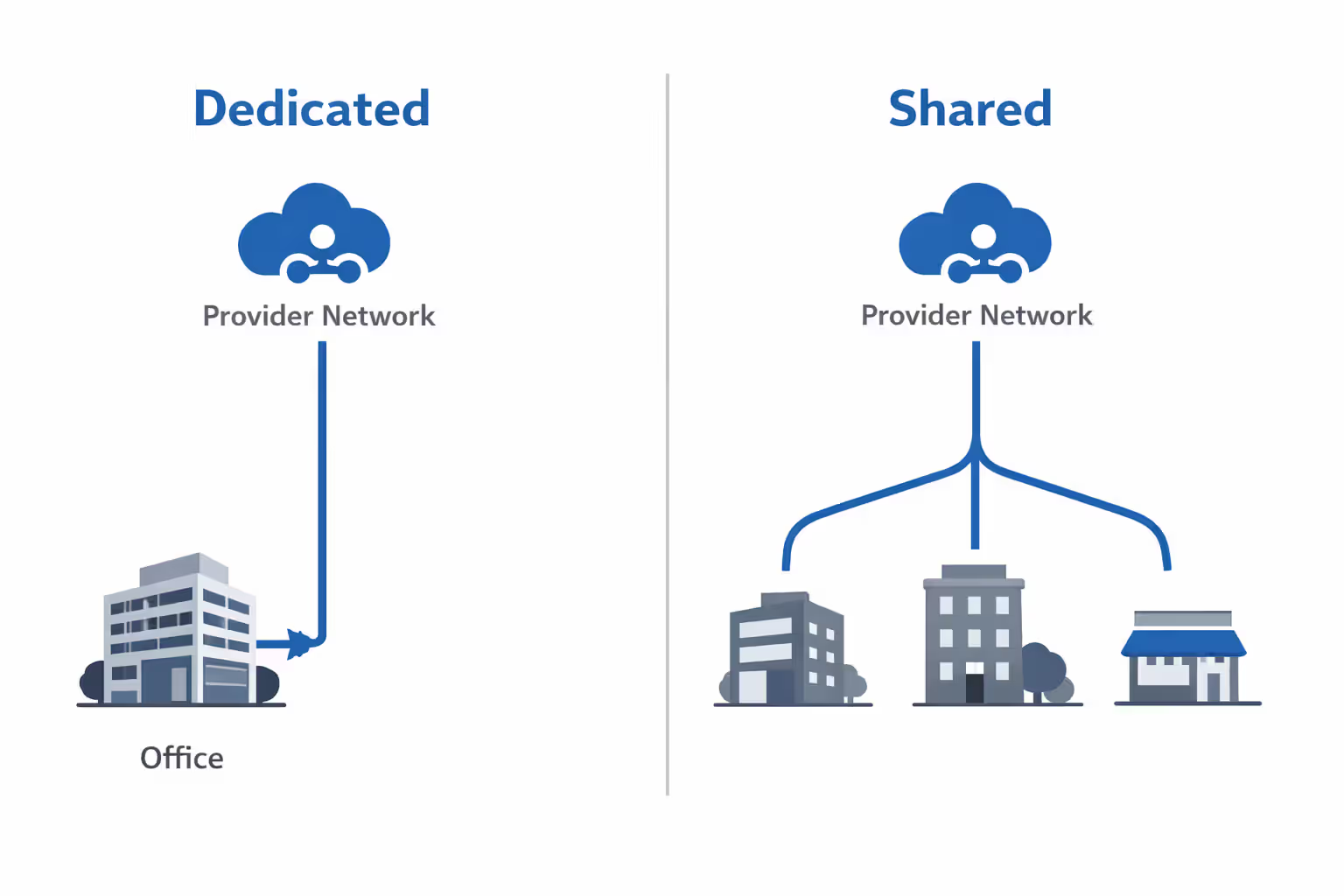
With DIA, you lease a private circuit from your location directly to your internet service provider's network. That bandwidth belongs exclusively to your business. If you purchase 100 Mbps, you receive 100 Mbps at all times, regardless of what neighboring businesses are doing online.
Shared fiber broadband operates like a highway with rush-hour traffic. Your provider installs fiber infrastructure serving multiple businesses and residential customers in your area. Everyone shares the same bandwidth pool. During periods of heavy usage—typically 9 AM to 5 PM for business areas—your actual throughput can drop significantly below your subscribed speed.
The bandwidth allocation model creates the fundamental difference. DIA providers guarantee your speeds through contractual commitments. Broadband fiber providers offer "up to" speeds with no performance guarantees. You might see 500 Mbps at 2 AM but struggle to maintain 50 Mbps during business hours.
Think of it this way: DIA is like owning a private road to the interstate. Shared fiber is like using a public road where you sometimes sit in traffic. Both get you to the same destination, but the experience differs dramatically based on conditions.
Author: Caroline Prescott;
Source: flexstarsolutions.com
The physical last-mile connection also differs. DIA typically uses point-to-point Ethernet circuits or wavelength services. Shared fiber often uses passive optical networks (PON) where a single fiber strand splits to serve multiple endpoints. This splitting technology—while cost-effective—inherently creates contention for bandwidth.
Performance Guarantees: SLAs, Uptime, and Symmetric Speeds Compared
Service Level Agreements separate enterprise connectivity from consumer-grade services. A DIA contract includes specific, measurable commitments with financial penalties if your provider fails to deliver. Broadband fiber typically includes no enforceable guarantees.
Most DIA providers commit to 99.9% uptime or higher. That translates to less than 9 hours of downtime per year. Many enterprise providers offer 99.99% SLAs (52 minutes annual downtime) or even 99.999% (5 minutes annually). When providers miss these targets, you receive service credits—typically prorated refunds based on the severity and duration of the outage.
Broadband fiber operates on a "best effort" basis. Your provider attempts to deliver reliable service but makes no binding commitments. When outages occur, you might wait hours or days for resolution with no compensation for business disruption.
Latency guarantees matter for real-time applications. DIA contracts often specify maximum round-trip latency (typically 30-50ms for regional connections), jitter (variation in latency, usually under 5ms), and packet loss (often guaranteed below 0.1%). These metrics directly impact VoIP call quality, video conferencing, and cloud application responsiveness.
| Metric | Typical DIA SLA | Typical Business Fiber |
| Uptime Guarantee | 99.9% - 99.99% | No guarantee (best effort) |
| Latency Commitment | ≤ 30-50ms regional | Not specified |
| Jitter Specification | ≤ 5ms | Not specified |
| Packet Loss Threshold | ≤ 0.1% | Not specified |
| Mean Time to Repair | 4-6 hours | 24-48 hours (no guarantee) |
| Support Response | 24/7 with 15-30 min response | Business hours, variable response |
| Financial Credits | Yes, automatic for SLA violations | No |
Symmetric speeds represent another critical distinction. DIA delivers identical upload and download speeds. A 100 Mbps DIA circuit provides 100 Mbps in both directions simultaneously. This symmetry proves essential for businesses hosting servers, conducting video conferences, backing up data to the cloud, or supporting remote workers accessing on-premise systems.
Broadband fiber frequently offers asymmetric speeds—fast downloads but slower uploads. A 500 Mbps broadband connection might include only 50-100 Mbps upload capacity. For businesses that primarily consume content, this works fine. For companies that generate and share large files, host applications, or rely on cloud backups, asymmetric connections create bottlenecks.
Business uptime requirements drive the decision between guaranteed and best-effort services. Calculate your downtime cost: lost revenue, idle employees, missed deadlines, and reputation damage. If an hour of downtime costs your business $5,000, paying extra for 99.99% uptime instead of accepting best-effort service makes financial sense.
Seven Factors That Determine Whether Your Business Needs DIA
Mission-critical applications and real-time services create the strongest case for dedicated connectivity. If your business operates SaaS platforms, hosts customer-facing applications, runs e-commerce sites, or provides telehealth services, inconsistent internet performance directly damages revenue and customer relationships. Any application where seconds of latency or brief outages cause measurable harm justifies DIA investment.
VoIP and video conferencing quality requirements depend heavily on consistent, low-latency connectivity. Shared fiber works acceptably for occasional Zoom calls, but businesses running call centers, conducting frequent client video meetings, or relying on unified communications systems need the jitter and latency guarantees that only DIA provides. A single dropped client call can cost more than months of DIA premium pricing.
Cloud-hosted infrastructure dependencies multiply bandwidth requirements and performance sensitivity. Companies that migrated on-premise servers to AWS, Azure, or Google Cloud now treat their internet connection as mission-critical infrastructure. If your employees access cloud-based ERP, CRM, file storage, or development environments throughout the workday, shared bandwidth contention creates productivity drags that accumulate across your entire workforce.
Remote workforce considerations changed dramatically after 2020. A handful of remote employees can work adequately over shared fiber. Twenty employees simultaneously accessing corporate networks, downloading files, and video conferencing require predictable bandwidth. DIA ensures your office internet supports remote workers accessing on-premise systems without degrading performance for on-site staff.
Data backup and disaster recovery needs often surface as hidden bandwidth consumers. Many businesses schedule nightly backups to cloud storage or remote data centers. These backups can consume hundreds of gigabytes. On shared fiber with asymmetric speeds and bandwidth contention, backups either take all night (creating vulnerability if daytime recovery is needed) or run during business hours and degrade performance for everyone else.
Compliance and security requirements sometimes mandate dedicated connectivity. Financial services, healthcare, and government contractors often face regulations requiring private circuits or documented SLA guarantees. Even without explicit mandates, security-conscious organizations prefer dedicated circuits that aren't shared with unknown neighbors who might introduce network threats or simply consume bandwidth during critical periods.
Growth trajectory and scalability planning should inform your decision timeline. A five-person startup can operate on shared fiber. That same company at 25 employees will likely need DIA. Rather than switching mid-growth, some businesses start with dedicated connectivity to avoid migration disruption. Others rightfully choose shared fiber initially and plan a future upgrade. The mistake is ignoring growth entirely and then scrambling when performance problems emerge.
Most businesses need DIA when internet connectivity transitions from utility to infrastructure. If losing internet for two hours merely annoys employees, shared fiber suffices. If that same outage halts operations, costs thousands in revenue, or violates customer commitments, you need dedicated access.

Author: Caroline Prescott;
Source: flexstarsolutions.com
Breaking Down the Cost: Why Dedicated Internet Commands Premium Pricing
DIA costs significantly more than shared fiber because the infrastructure investment differs fundamentally. Your provider must provision dedicated capacity from your location to their network core, reserve that bandwidth exclusively for your use, monitor performance against SLA commitments, and maintain redundant systems to meet uptime guarantees.
Shared fiber infrastructure serves multiple customers simultaneously, spreading costs across many subscribers. One fiber installation can serve dozens of businesses. DIA requires dedicated facilities—either a private fiber strand or dedicated wavelength—serving only your location.
Typical US market pricing for business fiber broadband ranges from $70-150 monthly for 100 Mbps to $200-400 for gigabit service. Installation fees run $0-500 for standard installations. Contracts usually span 1-3 years with early termination penalties.
DIA pricing varies significantly by location, distance from provider facilities, and bandwidth tier. Expect $300-700 monthly for 50 Mbps DIA, $500-1,200 for 100 Mbps, and $1,500-4,000 for gigabit service. Installation costs range from $1,000-5,000 depending on construction requirements. Contracts typically require 3-5 year commitments.
| Speed Tier | DIA Monthly Cost | DIA Install Fee | Business Fiber Monthly | Fiber Install Fee | DIA 3-Year TCO | Fiber 3-Year TCO |
| 50 Mbps | $400-700 | $2,000-3,500 | $80-120 | $0-300 | $17,400-28,700 | $2,880-4,620 |
| 100 Mbps | $600-1,200 | $2,000-4,000 | $100-200 | $0-300 | $23,600-47,200 | $3,600-7,500 |
| 500 Mbps | $1,200-2,500 | $2,500-5,000 | $150-300 | $0-500 | $45,700-95,000 | $5,900-11,300 |
| 1 Gbps | $1,800-4,000 | $3,000-5,000 | $250-500 | $0-500 | $67,800-149,000 | $9,500-18,500 |
These figures represent typical ranges. Actual pricing depends on your specific location, provider competition, building infrastructure, and distance to provider facilities. Urban areas with multiple competing carriers generally see lower DIA pricing than rural locations with limited options.
The hidden costs of downtime often justify DIA investment. Calculate your business cost per hour of internet outage: lost sales, idle employees, missed deadlines, and customer impact. If one outage costs $10,000 and DIA prevents just two outages annually compared to shared fiber, the service pays for itself even at $400 monthly premium pricing.
ROI calculation should include productivity factors beyond catastrophic outages. How much time do employees waste waiting for cloud applications to load? How many video meetings suffer quality problems? How often do large file transfers monopolize available bandwidth? These accumulated inefficiencies often exceed the cost of upgrading to dedicated access.
Contract terms significantly impact total cost. A 5-year DIA contract at $800 monthly costs $48,000 plus installation. Terminating early typically incurs penalties of 50-100% of remaining contract value. Budget for the full contract term and negotiate exit clauses before signing.

Author: Caroline Prescott;
Source: flexstarsolutions.com
Common Mistakes When Choosing Between Dedicated and Shared Fiber
Overbuying bandwidth you don't need wastes money without improving performance. A 20-person office with standard business applications rarely needs gigabit DIA. A 100 Mbps dedicated circuit often provides better actual performance than 500 Mbps shared fiber at lower cost. Assess your realistic bandwidth requirements rather than purchasing the highest speed available.
Calculate current usage during peak hours. Most businesses discover they use far less bandwidth than expected. A company consistently using 30-40 Mbps during busy periods doesn't need 500 Mbps capacity. Start with adequate bandwidth and contract terms that allow future upgrades as needs grow.
Underestimating growth and scalability creates the opposite problem. Locking into a 3-year contract for 50 Mbps DIA when you'll clearly need 200 Mbps within 18 months forces expensive mid-contract upgrades or performance compromises. Project realistic growth and build expansion options into your initial contract.
Ignoring contract terms and exit clauses traps businesses in unsuitable arrangements. Read termination provisions carefully. Some providers charge 100% of remaining contract value to exit early. Others allow termination with 90 days notice after an initial term. If you're uncertain about long-term needs, prioritize contract flexibility over marginal monthly savings.
Failing to test provider claims before committing leads to disappointment. Request trial periods or pilot installations when possible. Review actual SLA documents rather than trusting sales summaries. Verify the provider's physical network reaches your building—some "available" services actually require expensive construction you'll fund.
Check provider reputation through independent sources. Sales representatives promise excellent support, but online reviews and peer references reveal actual service quality. A provider with poor technical support negates SLA value when you can't get issues resolved.
Overlooking local loop quality causes problems even with premium services. The connection from your building to the provider's network matters as much as the provider's backbone. Older buildings with deteriorated conduit, locations far from provider facilities, or areas requiring street construction face higher costs and longer installation timelines.
Request a site survey before finalizing contracts. Providers assess physical feasibility and identify potential construction needs. Discovering your building requires $15,000 in conduit work after signing a contract creates budget problems and delays.

Author: Caroline Prescott;
Source: flexstarsolutions.com
How to Evaluate Providers and Make Your Decision
Start by requesting detailed proposals from multiple providers. Specify your exact location, required bandwidth, uptime needs, and contract preferences. Compare proposals across total cost, SLA specifics, installation timeline, contract terms, and included support.
Questions to ask potential DIA vendors reveal service quality and contract suitability:
- What specific SLA metrics do you guarantee, and what credits apply for violations?
- How is latency measured and reported—can I access real-time performance data?
- What redundancy exists between my location and your network core?
- What's your average time to repair circuit outages at my location?
- Do you own facilities to my building or subcontract last-mile connectivity?
- What happens if I need to upgrade bandwidth mid-contract?
- Can you provide references from similar businesses in my area?
Red flags in service proposals include vague SLA language without specific metrics, installation timelines marked "TBD" without site surveys, pricing that seems dramatically lower than competitors without clear explanation, and unwillingness to provide customer references.
Testing methodology before committing protects against poor decisions. If possible, request a trial period or pilot installation. Review actual SLA documents—not sales summaries—to understand exact commitments. Test the provider's support responsiveness by calling their technical support line with questions before becoming a customer.
Businesses often focus entirely on bandwidth and price, but the real value of dedicated internet access lies in predictability. When you're evaluating providers, ask yourself whether you're buying a commodity connection or infrastructure your business depends on. If your internet connection failing for four hours would create serious business consequences, the cost difference between DIA and shared fiber is irrelevant—you need guaranteed performance
— Michael Rodriguez
Decision framework based on business size and requirements:
1-10 employees with standard applications: Shared fiber typically sufficient unless you host critical applications or have specific compliance requirements. Budget $100-200 monthly.
10-25 employees with moderate cloud dependence: Evaluate both options. If you experience performance problems with shared fiber, DIA becomes cost-effective. Budget $300-800 monthly for DIA if needed.
25-50 employees or heavy cloud usage: DIA recommended for consistent performance. Budget $600-1,500 monthly depending on bandwidth needs.
50+ employees or mission-critical applications: DIA essential. Consider redundant circuits from diverse providers for additional reliability. Budget $1,500-4,000+ monthly.
These guidelines provide starting points, not absolute rules. A 10-person software company hosting customer applications needs DIA. A 40-person retail business with basic email and web browsing might operate fine on shared fiber.
FAQ: Dedicated Internet Access vs Fiber Broadband
Making the Right Choice for Your Business
Choosing between dedicated internet access and shared fiber broadband comes down to understanding what your business truly needs versus what sounds appealing in sales presentations. The technology itself—fiber-optic cables—remains the same. The service architecture, performance guarantees, and cost structure differ dramatically.
Shared fiber broadband serves many businesses effectively. If your operations tolerate occasional slowdowns, if internet outages cause inconvenience rather than crisis, and if budget constraints matter more than guaranteed performance, quality business fiber broadband provides excellent value.
Dedicated internet access becomes essential when your business depends on consistent connectivity. Mission-critical applications, real-time services, cloud infrastructure, and remote workforce support all benefit from guaranteed performance. The premium pricing reflects real infrastructure costs and binding service commitments that protect your business from the hidden costs of unreliable connectivity.
Evaluate your actual requirements honestly. Calculate downtime costs, assess application sensitivity, project growth needs, and compare total costs including productivity impacts. The right answer depends entirely on your specific business circumstances—not on generic recommendations or sales pressure.
Most importantly, recognize that this decision isn't permanent. Businesses outgrow shared fiber and upgrade to DIA. Others discover they overbuilt and scale back. Start with a clear understanding of your current needs, build flexibility into contracts where possible, and revisit the decision as your business evolves.
Related Stories
Read more
Read more




The content on this website is provided for general informational and educational purposes only. It is intended to offer guidance on internet technology topics, including internet providers, connection types (fiber, cable, and 5G home internet), WiFi setup, router configuration, internet speed requirements, and online security practices. The information presented should not be considered technical, legal, or professional networking advice.
All information, articles, comparisons, and technical explanations on this website are for general informational purposes only. Internet service availability, performance, speeds, equipment requirements, and security features may vary by provider, location, infrastructure, and individual network configuration. Actual internet performance and reliability depend on many factors, including hardware, service plans, local network conditions, and user behavior.
This website is not responsible for any errors or omissions in the content or for actions taken based on the information provided. Reading this website does not create a professional or service relationship. Users are encouraged to consult with their internet service provider, network specialist, or qualified technical professional for advice specific to their internet setup, equipment, or connectivity needs.