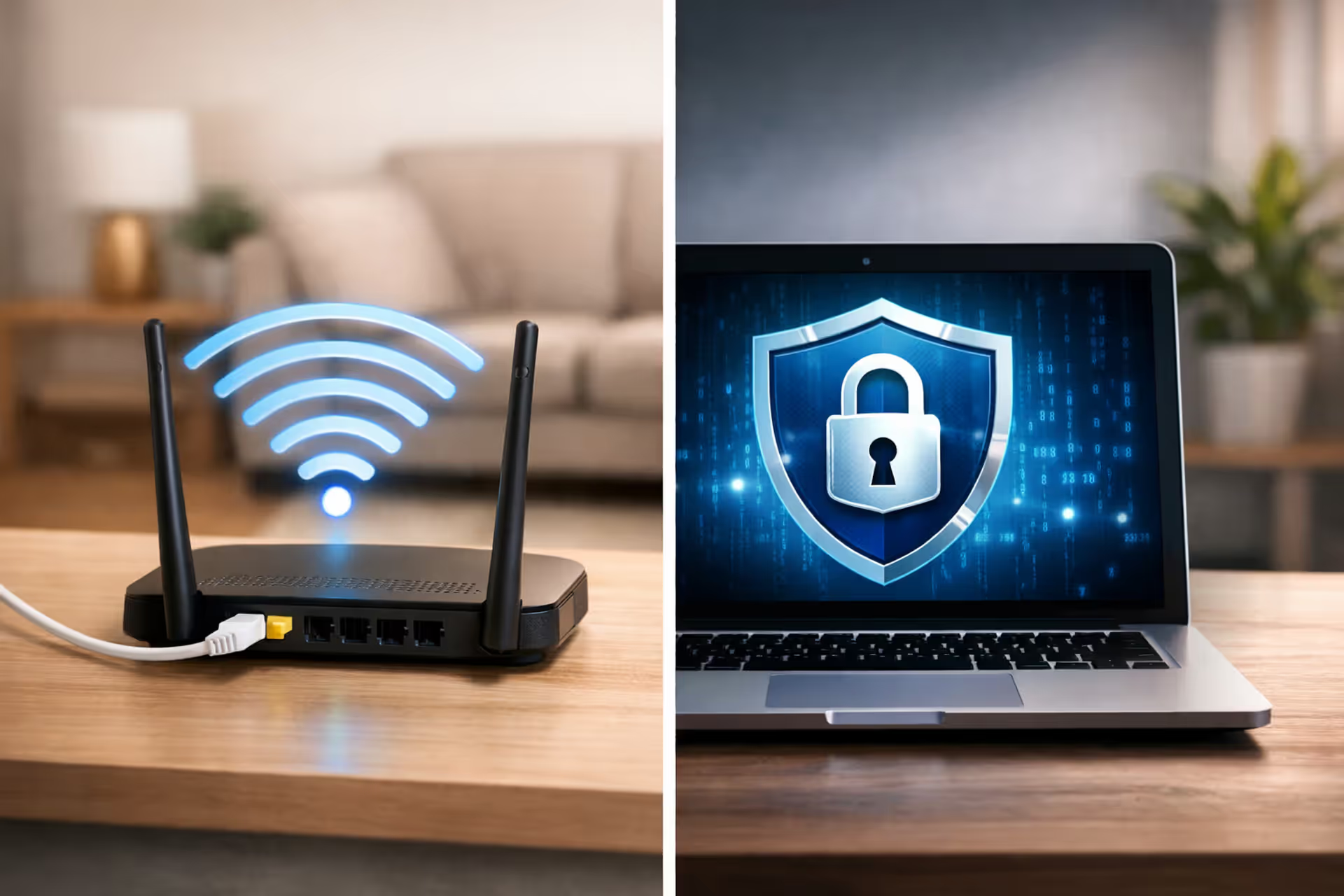
Split-screen illustration showing a WiFi router emitting radio waves on the left side and a laptop screen displaying a VPN shield lock icon on the right side, separated by a clear dividing line in a modern home setting
Does a VPN Replace WiFi or Work With It

Content
Last month, my neighbor knocked on my door at 9 PM. She'd just subscribed to NordVPN and couldn't figure out why her laptop still wouldn't connect to the internet. Her WiFi router sat unplugged in a closet. She genuinely believed the $12 VPN subscription would beam internet directly to her devices.
She's not alone in this confusion. Thousands of people Google "does VPN replace WiFi" every month, usually right after purchasing VPN software and realizing their internet bill didn't disappear. Here's what's actually happening: WiFi gets internet to your devices wirelessly. A VPN scrambles the data moving through that connection. They're as interchangeable as tires and insurance on a car—you need both, but they do completely different jobs.
Your router takes the internet signal from Comcast or Verizon and broadcasts it as radio waves throughout your house. VPN software wraps your browsing activity in encryption layers so nobody can peek at what you're doing online. Your router pushes connectivity outward. Your VPN cloaks the traffic flowing through that connectivity.
Why does this matter? Because if Spectrum's network goes down in your neighborhood, clicking "connect" on ExpressVPN won't bring it back. If your router dies, your $10 monthly VPN subscription can't resurrect it. The technologies don't overlap—they stack.
The Fundamental Difference Between VPN and WiFi
Walk over to your internet router right now. See that ethernet cable plugged into the back? That's your physical connection to your ISP's network. The router converts that wired signal into radio frequencies—the WiFi your phone detects when you're home. Any device with a wireless adapter within roughly 150 feet can pick up these broadcasts and join your network.
Author: Lindsey Hartwell;
Source: flexstarsolutions.com
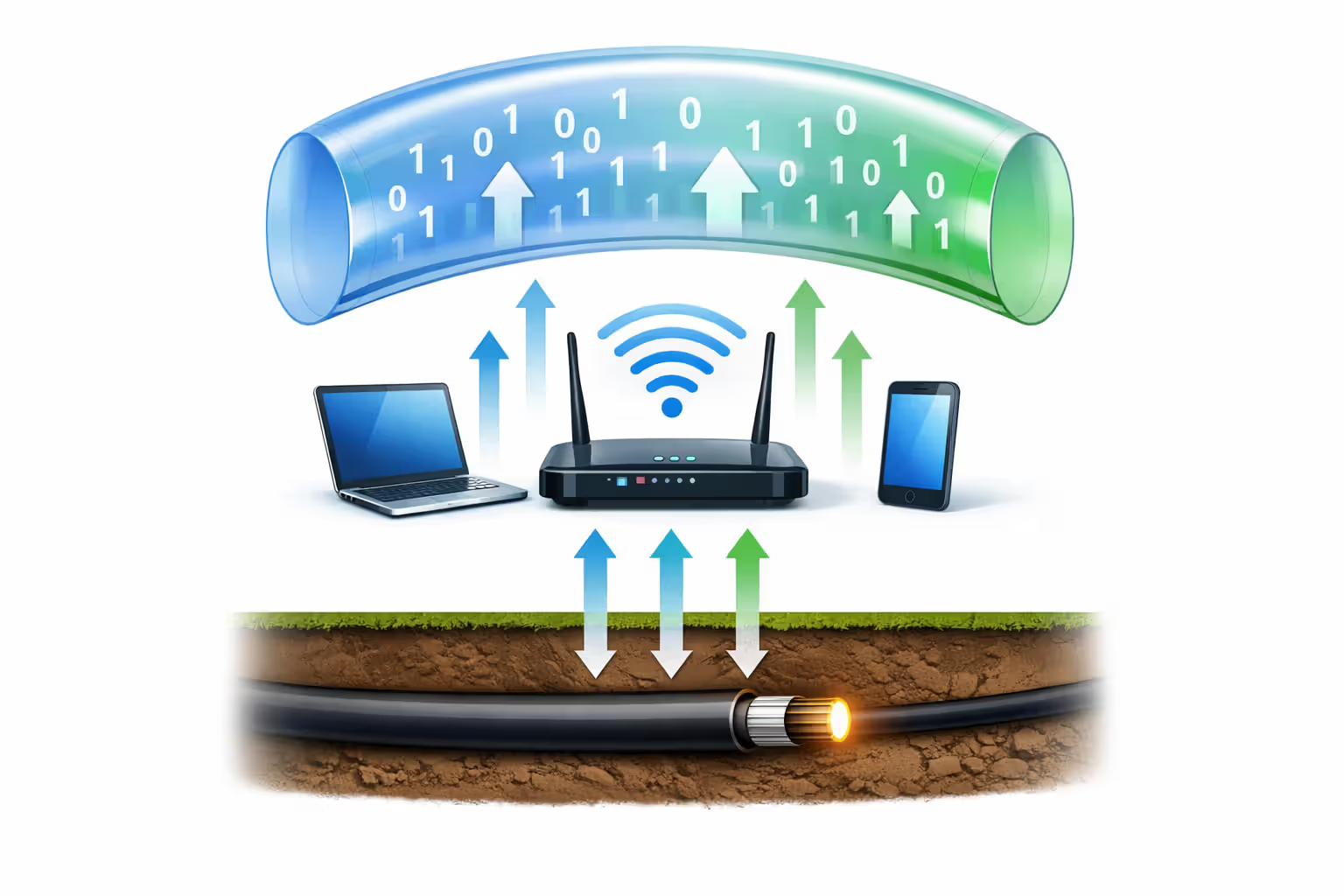
VPNs work three steps later in this process. You're already online—connected through WiFi, cellular data, or an ethernet cable. The VPN application launches and builds an encrypted tunnel to a remote server owned by the VPN company. Everything you do online now routes through this protected pathway instead of traveling naked across the internet.
Here's a real support ticket I saw on Reddit last year: "Just bought ExpressVPN but my phone says 'no internet connection.' Does VPN give you WiFi or what?" The answers revealed the actual problem—the person had never paid for home internet service. They'd purchased encryption software for a connection that didn't exist. Like buying a steering wheel lock for a car you haven't bought yet.
Power users sometimes install VPN apps directly on their routers, encrypting every device's traffic automatically. Smart setup, but it still requires three separate pieces: the ISP delivering internet to your house, the router broadcasting WiFi, and the VPN software adding encryption. Remove any single piece and the whole system breaks.
Common VPN Myths That Confuse Users
The "unlimited access" trap. VPN ads promise unlimited browsing and unrestricted content. Marketing teams know these phrases sound like "unlimited internet." What they actually mean: the VPN won't cap how much you browse, and it'll help you reach region-blocked websites. Your actual internet—the pipes bringing connectivity to your address—still comes from Xfinity, AT&T, or whoever installs physical cables in your neighborhood.
The monthly bill confusion. I've met three different people this year who tried canceling their Spectrum subscription after buying Private Internet Access. Their logic made sense at first glance: "I'm paying $70 to Spectrum and $10 for PIA. They both say they provide internet access. Why pay twice?" Because Spectrum owns the cables running to your house. PIA is an app running on your computer. One delivers the actual connectivity. The other protects your privacy after you're already connected.

Author: Lindsey Hartwell;
Source: flexstarsolutions.com
The WiFi broadcasting misconception. VPN software displays little icons showing connection status and network activity. This visual similarity to WiFi indicators creates confusion. People think installing NordVPN turns their laptop into a WiFi hotspot that nearby devices can join. Nope. Your router broadcasts WiFi. The VPN just encrypts what flows through it—no signals, no hotspot, no wireless network creation.
The "free internet" scam. Hundreds of shady apps in the Google Play Store promise free internet if you download their VPN. These apps prey on people searching "does VPN provide internet" or similar phrases. You install the app, tap connect, and... error message. Your phone has no internet connection to encrypt. Worse yet, many of these sketchy apps harvest your contacts, install trackers, or hijack your browser. A reputable IT repair shop owner told me she sees two or three victims per week who fell for this scheme.
One customer called her insisting that his "internet VPN was broken." Twenty minutes of troubleshooting revealed pristine software. Finally she asked: "Who's your internet provider?" Long pause. "Well, I cancelled Comcast two weeks ago because I didn't want to pay for internet twice now that I have the VPN." He'd genuinely calculated that $12 monthly should replace his $80 broadband bill.
How VPNs Work With Your Existing Internet Connection
Hit the power button on your VPN app. Behind the scenes, your device establishes an encrypted connection to a server that your VPN company operates in some data center. This encrypted tunnel travels over whichever internet you're currently using—home WiFi, cellular data from T-Mobile, public library WiFi, or an ethernet cable at work.
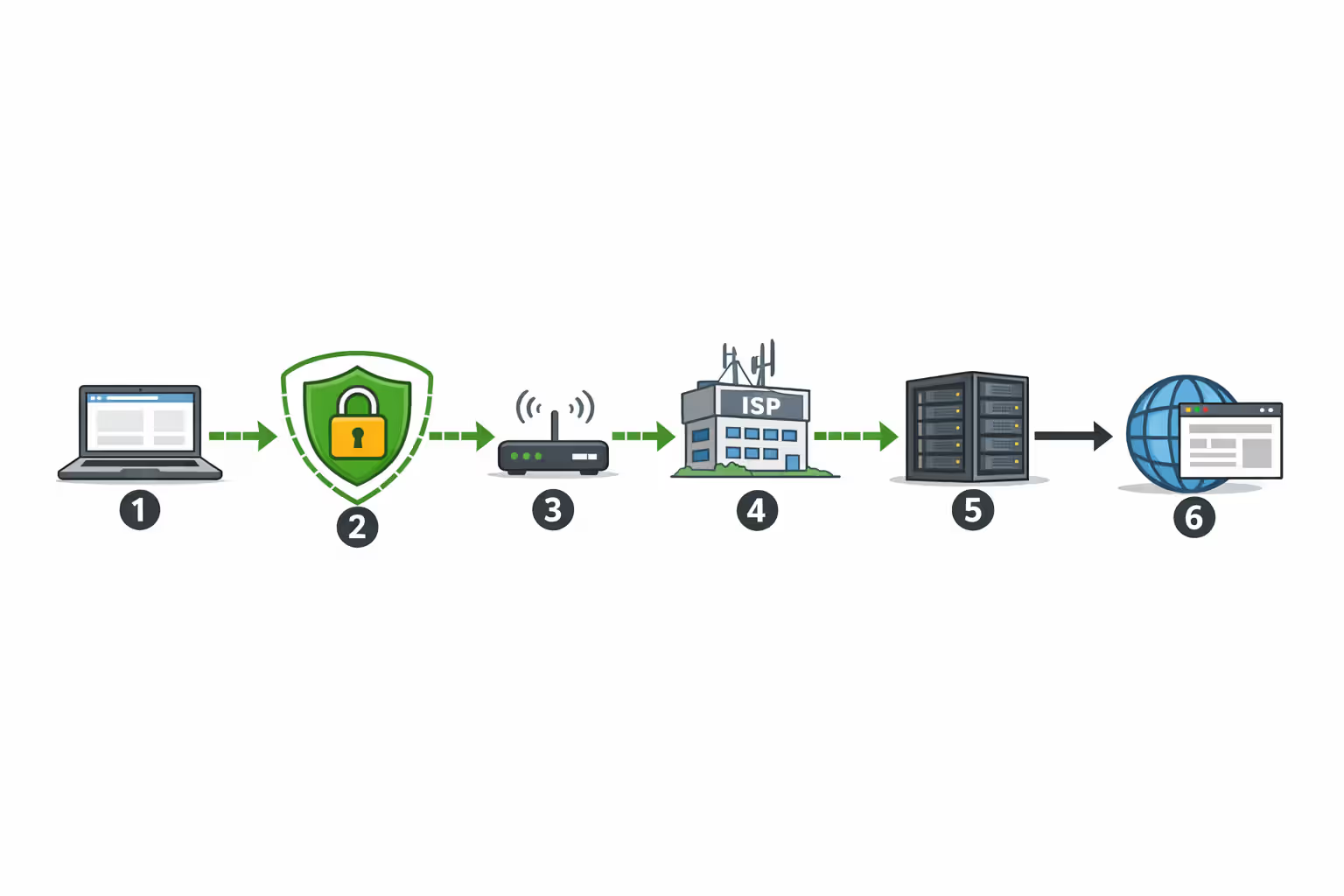
Follow a single web request through this system: You type "weather.com" into your browser. Instead of your laptop requesting that page directly, the VPN intercepts it first. The software wraps your request in multiple layers of encryption—think of it like putting a letter inside a locked box inside another locked box. This encrypted package goes through your WiFi to your router. Your router forwards it to your ISP's network without knowing what's inside. Your ISP routes it across the internet to your VPN provider's server in, say, Dallas. That Dallas server unwraps all the encryption, sees you want weather.com, fetches the page, encrypts it again, and ships everything back through the chain in reverse.
Author: Lindsey Hartwell;
Source: flexstarsolutions.com
Network engineers call this "tunneling"—your data travels through public infrastructure inside protective encryption. Building a tunnel requires ground to dig through. No existing internet means nowhere to build the tunnel, no foundation to construct anything on top of.
Your WiFi router treats VPN traffic like any other data. It doesn't distinguish encrypted VPN packets from regular Netflix streams or email downloads—both move through its circuits identically. Your ISP sees that you're connected to a VPN server and watches encrypted information flowing back and forth, but can't crack it open to see which websites you're actually visiting. The destination website (weather.com in this example) receives requests from the VPN server's IP address in Dallas, not your actual home address in Portland.
Connection quality impacts VPN performance dramatically. Weak WiFi signals create slowdowns in the encrypted tunnel. Crowded networks at coffee shops congest the pathway. Mobile data works perfectly fine, but your carrier still counts every byte of VPN traffic against your monthly data cap. Ethernet cables generally deliver the smoothest VPN experience because they bypass wireless interference entirely and maintain consistent speeds.
What VPNs Actually Protect When You're on WiFi
VPN encryption shields data traveling between your device and the VPN company's server. You're sitting in Starbucks using their public WiFi? That encryption prevents the stranger three tables over from capturing and reading your traffic. Without this protection, someone running freely available hacking tools like Wireshark could potentially monitor which sites you visit, steal passwords you type on unsecured pages, or intercept confidential documents you're downloading.
But this protection has definite boundaries. At home, a VPN hides your specific browsing destinations from your ISP (Comcast only sees you're connected to a VPN server, not that you're reading Reddit). The service doesn't conceal that you're consuming internet or disguise your total bandwidth usage. Your provider's systems still track your account's data consumption and monthly activity—just not the detailed list of every website you visit.
Public WiFi at airports, hotels, or McDonald's requires stronger protection because dozens of strangers share that network simultaneously. Minimal oversight. Anyone could be running traffic analysis software. A VPN transforms these sketchy networks into reasonably secure connections by guaranteeing that anyone who intercepts your traffic sees only scrambled gibberish instead of your actual passwords and credit card numbers.
VPN encryption doesn't stop several common online threats. Malware that's already infected your laptop keeps operating regardless of whether you activate a VPN. Phishing emails that trick you into typing your password on a fake website completely bypass VPN protection. Terrible security habits like using "Password123" across fifteen different accounts remain vulnerabilities that no amount of encryption can patch. If ransomware has compromised your computer, a VPN encrypts your outbound traffic but doesn't detect or eliminate the infection.
School and workplace network administrators can still identify that you're using a VPN even though they can't monitor what you're doing through it. Many organizations specifically ban VPN connections in their acceptable use policies. The encryption protects your data from interception but doesn't turn your device invisible to monitoring systems.
Think of VPNs as protective tunnels through networks that already exist. They can't generate connectivity from nothing—they add privacy layers to connections that other services provide. Understanding this relationship helps people figure out when VPN technology actually solves their specific problems
— Dr. Sarah Chen
When You Actually Need a VPN (And When You Don't)
Scenarios Where VPNs Add Real Value
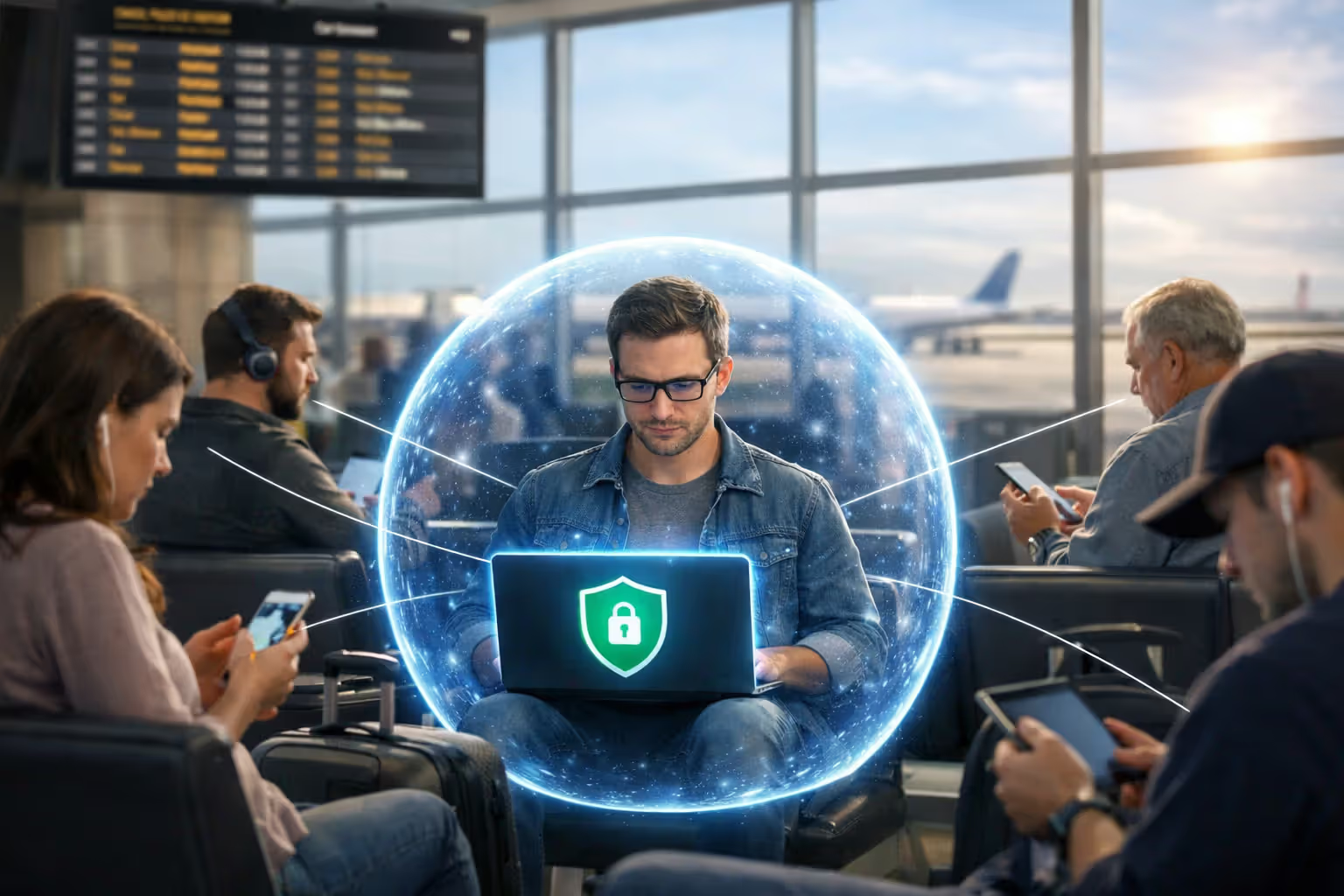
Public wireless at airports and hotels. These networks prioritize convenience over everything else. Security? Barely an afterthought. Airport WiFi often lacks even basic encryption, letting anyone with moderate technical skills monitor other passengers' browsing. Hotel networks might serve 200 guests simultaneously with minimal oversight. VPN encryption transforms these risky situations into connections nearly as protected as your home network behind a password-protected router.
Keeping browsing private from ISPs. Comcast, Verizon, and other broadband providers track which websites their customers visit. They package this behavioral data and sell it to advertisers. VPN encryption blocks this surveillance by hiding your destinations. Your ISP observes continuous encrypted traffic flowing to a VPN server but can't see the actual websites you're accessing through that server.
Accessing region-blocked content. BBC iPlayer only works in the UK. Hulu blocks non-US viewers. Various news sites and streaming platforms restrict content based on geographic location. VPNs route your traffic through servers in different countries, making these websites think you're browsing from those locations. Does this technically violate terms of service? Usually yes. Do millions of people do it anyway? Also yes.
Preventing selective bandwidth throttling. Some ISPs deliberately slow down connections when they identify high-bandwidth activities—video streaming, large downloads, gaming. VPN encryption conceals your specific activities, sometimes circumventing this selective throttling. Effectiveness varies wildly depending on how your particular provider implements traffic management. Comcast might throttle differently than Charter.
Handling sensitive work on untrusted networks. Checking your bank balance at the airport? Accessing medical records at a coffee shop? Reviewing confidential work documents on hotel WiFi? VPN encryption provides essential protection in these scenarios. Even if the network itself has been compromised by hackers, your encrypted data remains secure from interception.
Author: Lindsey Hartwell;
Source: flexstarsolutions.com
Situations Where VPNs Won't Help
Speeding up slow internet. VPN encryption adds processing overhead and routes traffic through extra server hops. Expect speeds to drop 10-40% compared to direct connections. The only exception: when your ISP throttles specific traffic types that VPN encryption successfully conceals. This scenario happens, but it's far less common than VPN marketing would have you believe.
Blocking every online threat. Encryption protects data moving through networks. It doesn't scan files for viruses, filter out phishing attempts, or prevent social engineering scams. You still need antivirus software for malware detection, healthy skepticism toward suspicious emails, and careful browsing habits. VPNs handle one security layer—not comprehensive protection against every possible threat.
Eliminating security software requirements. Different tools address different vulnerabilities in different ways. VPN software encrypts network traffic. Antivirus programs scan downloaded files for malicious code. Firewalls control which applications can make network connections. Strong security requires multiple tools working together, not a single magic solution.
Hiding everything from your ISP. Your provider continues tracking total bandwidth consumption, connection timestamps, and the simple fact that you're routing traffic through a VPN service. Encryption only conceals which specific websites you visit. Download three terabytes this month? Your ISP's systems record that figure regardless of VPN usage.
Getting internet without paying providers. This misconception appears so frequently in user questions that it deserves extra emphasis. VPN services cannot generate internet connectivity. You absolutely must maintain an active subscription with an ISP, mobile carrier, or other internet provider before VPN software provides any functionality whatsoever. Period.
VPN vs WiFi vs Internet Service: Side-by-Side Comparison
| Technology | Provides | Pricing | Core Purpose |
| WiFi Router | Wireless radio signals letting nearby devices connect to your network without physical cables | $50-300 one-time purchase plus nominal electricity costs | Takes your wired internet connection and broadcasts it wirelessly around your home or office |
| Internet Provider (ISP) | Physical cables, fiber lines, and networking equipment connecting your address to the global internet | $30-100+ monthly subscription depending on speed tier and location | Actually delivers internet access to your location and determines your maximum bandwidth |
| VPN Subscription | Encrypted tunnel protecting your data as it travels through existing connections | $3-12 monthly (or limited free versions with ads/restrictions) | Adds privacy and security to connections you've already established through other means |
Notice the pattern here? Internet providers deliver the actual connectivity. Routers broadcast that connectivity wirelessly throughout your space. VPN services layer encryption on top of traffic flowing through those connections. Each handles a unique job that the others can't perform.
Pricing structures reinforce these separate roles. Internet providers charge monthly for network access and bandwidth capacity. Routers require one-time purchases that handle wireless broadcasting. VPN companies charge subscription fees for server access and encryption tools. Three different payments funding three different functions that complement rather than compete with each other.
Frequently Asked Questions About VPNs and Internet Connectivity
VPNs and WiFi perform completely separate functions that don't overlap. Internet providers deliver connectivity to your physical address. Routers distribute that connectivity wirelessly via WiFi signals. VPN applications encrypt information traveling through those WiFi connections to boost your privacy.
These aren't competing alternatives you choose between—they're complementary technologies designed to work in combination. Trying to use VPN software without existing internet access resembles attempting to use a car's alarm system without owning the actual car. The security feature only delivers value when the underlying system already exists.
Here's the practical understanding most people need: keep paying your ISP for internet access, use WiFi routers for wireless convenience, and add VPN encryption if you frequently connect to public networks or want stronger privacy protection from your provider. Each technology serves a specific purpose. All three coexist without conflict. None can substitute for what the others do.
When someone asks whether VPNs can replace their WiFi, the answer becomes obvious: no, because they operate in fundamentally different categories. One delivers connectivity itself, the other encrypts data flowing through that connectivity. Both provide value. Neither duplicates the other's function. Understanding this distinction helps you make smarter decisions about your online security setup without wasting money on services that don't solve your actual problems.