

T-Mobile 5G home internet white gateway device on a wooden desk near a window in a bright modern living room with a laptop and coffee cup nearbyT-Mobile 5G home internet white gateway device on a wooden desk near a window in a bright modern living room with a laptop and coffee cup nearby
Is T-Mobile WiFi Good Enough to Replace Your Cable Internet

T-Mobile Home Internet has disrupted the broadband market by offering wireless home internet without contracts, data caps, or installation appointments. But does it actually deliver reliable service, or are you trading stability for convenience? After analyzing speed tests, user reports, and real-world deployment scenarios, here's what you need to know before cutting the cable.
How T-Mobile Home Internet Actually Works
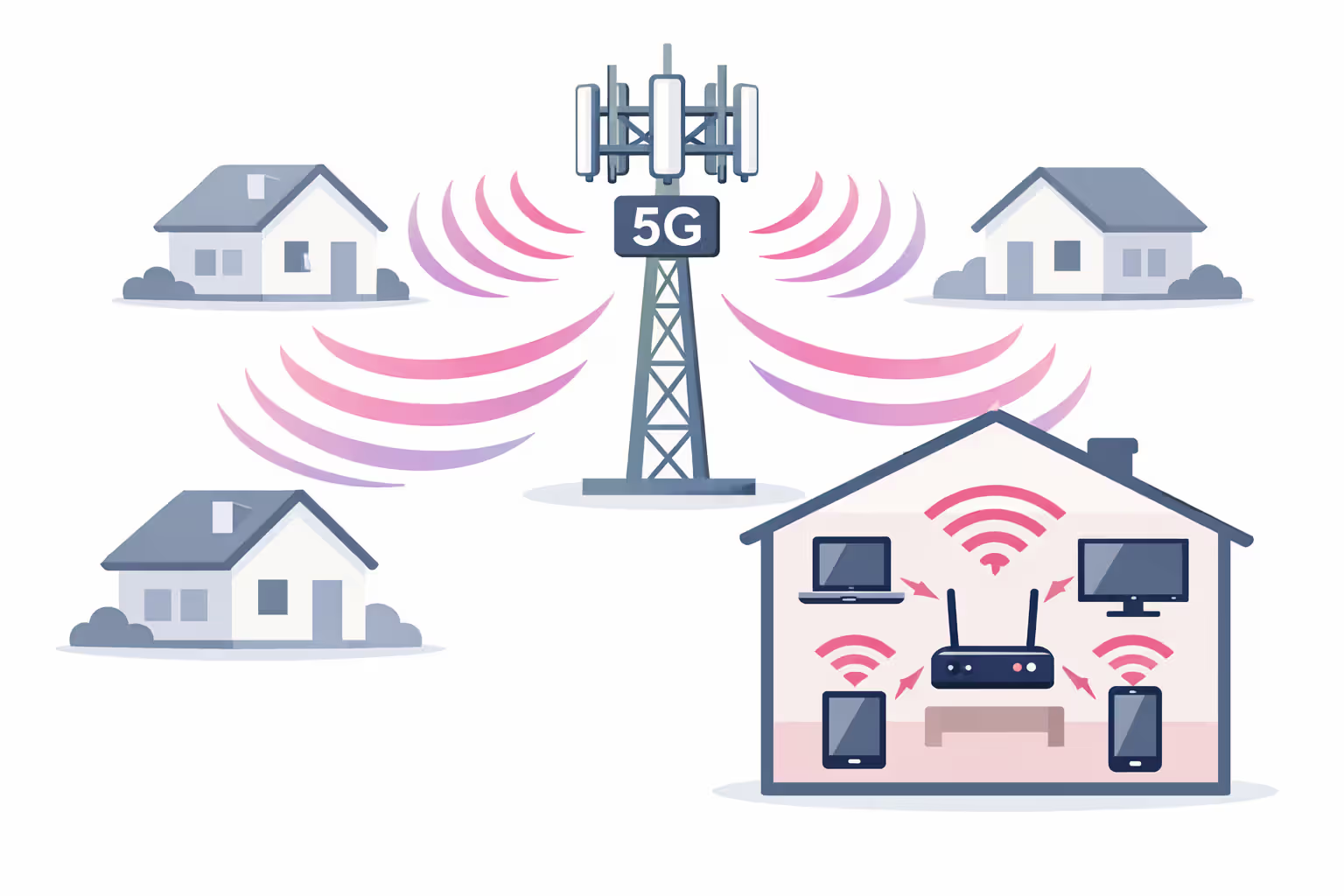
T-Mobile Home Internet operates on the same 5G and 4G LTE cellular towers that power your smartphone. Instead of running a physical line to your house, the service uses a gateway device that connects to nearby cell towers and broadcasts WiFi throughout your home.
The gateway receives data through cellular signals—prioritizing 5G Ultra Capacity (mid-band) and 5G Extended Range where available, then falling back to 4G LTE when necessary. This approach eliminates the need for technician visits, cable trenching, or fiber installation.
Coverage and availability represent two different concepts here. T-Mobile might have excellent mobile coverage in your area, but home internet availability depends on tower capacity. The company limits subscriptions per tower to prevent network overload, which means you might see five bars on your phone yet still be waitlisted for home service.
The gateway itself combines a cellular modem, router, and WiFi access point in one device. Most customers receive either the Arcadyan KVD21 or the newer Sagemcom Fast 5688W, both supporting WiFi 6 and handling up to 128 connected devices. These gateways lack advanced features found in standalone routers—no port forwarding, limited parental controls, and basic network management.
Author: Lindsey Hartwell;
Source: flexstarsolutions.com
Speed and Performance: What to Expect in Real-World Use
T-Mobile advertises typical download speeds between 72-245 Mbps, but real-world performance varies dramatically based on your proximity to towers, network congestion, and whether you're accessing 5G or 4G.
Download and Upload Speeds by Location Type
Urban users near 5G Ultra Capacity towers consistently report the fastest speeds, often exceeding 300 Mbps during off-peak hours. Suburban customers typically experience the advertised range, while rural users on 4G LTE frequently see speeds drop below 50 Mbps.
Upload speeds remain the service's weak point across all locations. Unlike cable's asymmetric profile that still provides 10-35 Mbps uploads, T-Mobile users average 15-25 Mbps in optimal conditions and sometimes struggle to maintain 5 Mbps during congestion.
| Location Type | Average Download | Average Upload | Latency | Consistency Rating |
| Urban (5G UC) | 180-350 Mbps | 20-40 Mbps | 25-35ms | Good (75%) |
| Suburban (5G) | 85-180 Mbps | 12-25 Mbps | 30-45ms | Moderate (60%) |
| Rural (4G LTE) | 25-80 Mbps | 5-15 Mbps | 40-70ms | Variable (45%) |
The consistency rating reflects how often users maintain speeds within 20% of their average—a metric that matters more than peak performance for daily use.
Peak vs. Off-Peak Performance Differences
Network congestion follows predictable patterns. Speeds typically peak between 2-5 AM when cellular traffic drops. The evening window from 7-11 PM brings noticeable slowdowns, especially in apartment complexes where multiple residents share tower capacity.
One user in Phoenix reported 280 Mbps at 3 AM but saw speeds crater to 45 Mbps during weeknight streaming hours. This variability stems from T-Mobile's network management: home internet customers receive lower priority than postpaid mobile users during congestion. You're essentially sharing bandwidth with everyone on their phones nearby.
Weekends show less dramatic swings unless you live near stadiums, shopping districts, or event venues that draw crowds. A customer near a college campus experienced consistent service during summer break, then faced buffering issues once students returned in fall.
T-Mobile Gateway Setup and Optimal Placement Strategies
The gateway arrives pre-configured with your network name and password printed on the bottom. Plug it in, wait three minutes for it to acquire a signal, and connect your devices. No installation appointment, no drilling holes, no waiting for a technician window.
The LCD screen displays signal strength through a cellular icon with bars—but these bars lie. They show connection status, not quality. For accurate readings, access the T-Mobile Internet app and check the "Advanced Cellular Metrics" section. You want RSRP (signal strength) above -100 dBm and SINR (signal quality) above 5 dB for acceptable performance.
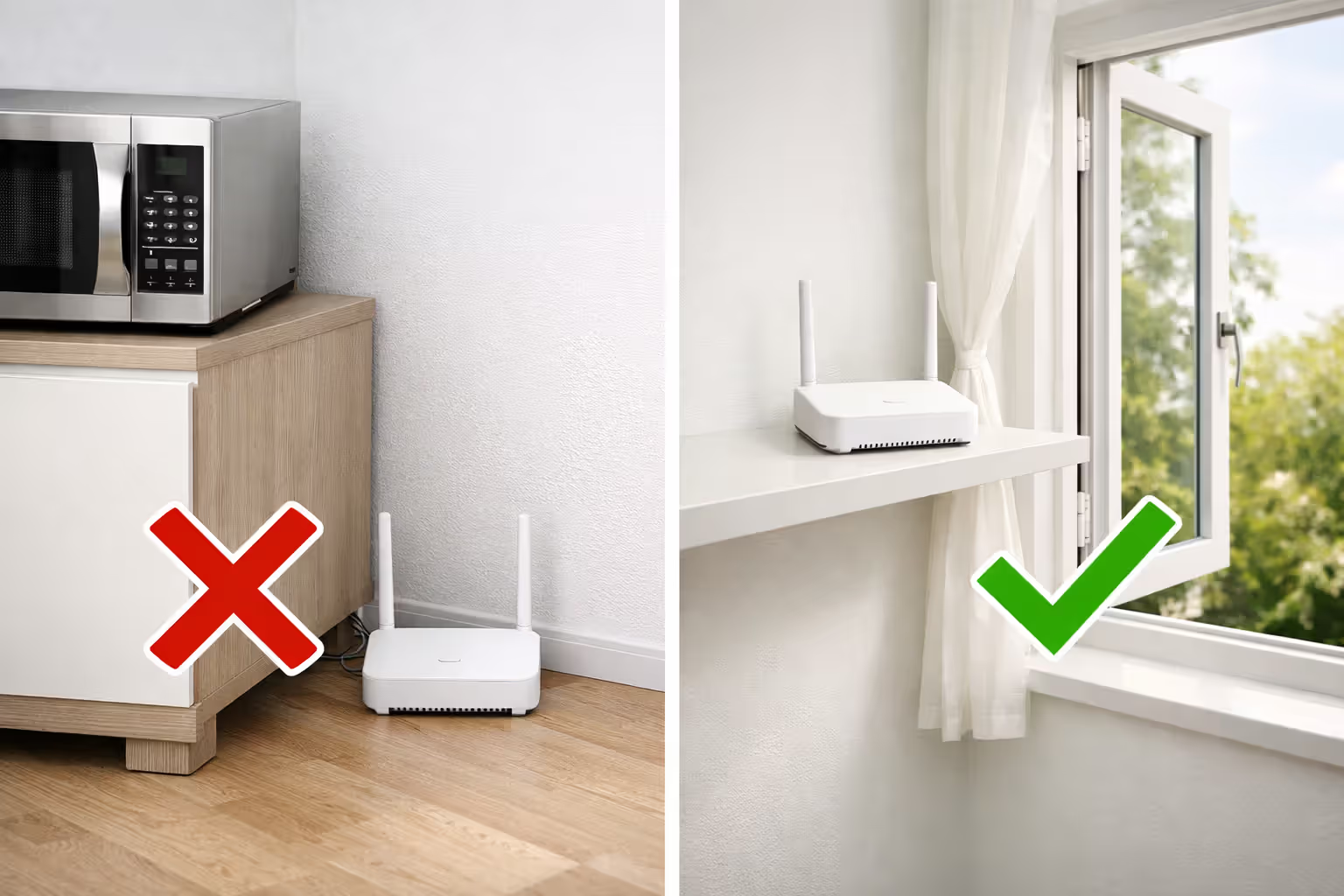
Start placement testing near a window facing the nearest tower. T-Mobile's app includes a basic tower locator, but CellMapper provides more precise locations. Cellular signals penetrate windows better than walls, especially 5G mid-band frequencies that struggle through brick and metal siding.
Move the gateway room by room, checking metrics at each location. Wait two minutes after each move for readings to stabilize. One customer gained 60 Mbps simply by relocating from a basement office to a second-floor bedroom window. Another discovered their kitchen's metal backsplash was blocking signals, reducing speeds by 40%.
Height matters. Placing the gateway on a bookshelf or desk typically outperforms floor placement. Avoid these common mistakes: tucking it inside cabinets, placing it near metal appliances, positioning it in corners where walls block two sides, or putting it in basements where concrete foundations attenuate signals.
The gateway generates heat during operation. Ensure adequate ventilation—don't stack items on top or surround it with books. Overheating triggers thermal throttling that degrades performance without warning.
Author: Lindsey Hartwell;
Source: flexstarsolutions.com
Reliability Issues You Should Know About
T-Mobile home internet reliability depends heavily on factors outside your control. Network congestion remains the primary complaint, particularly in densely populated areas where tower capacity gets stretched during peak hours.
Deprioritization affects home internet customers differently than mobile users. When towers reach capacity, T-Mobile slows home internet traffic before throttling postpaid phone customers. This means your service quality depends partly on how many people nearby are streaming videos on their phones. A customer in downtown Seattle reported consistent 200 Mbps speeds until a nearby apartment building filled up, after which evening speeds rarely exceeded 60 Mbps.
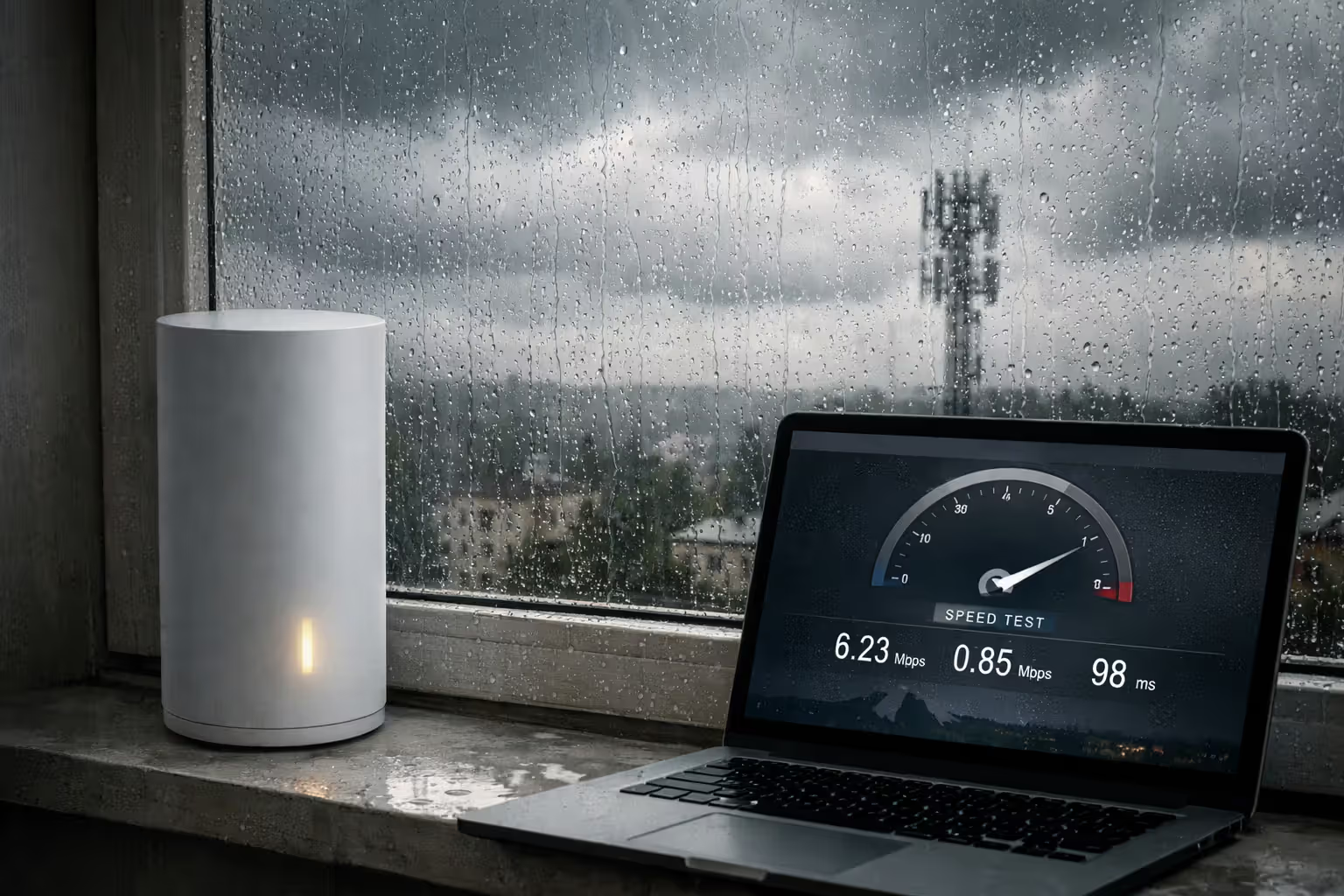
Weather impacts differ from cable internet. Heavy rain and snow can degrade cellular signals, though the effect varies by frequency band. 5G mid-band (2.5 GHz) handles weather better than millimeter wave but worse than 4G LTE. One Minnesota user noticed 20-30% speed drops during snowstorms, while their neighbor with cable saw no weather-related changes.
Outage frequency runs lower than the cable average in most markets. Cellular networks include built-in redundancy—if one tower goes down, your gateway often connects to another. Cable outages typically affect entire neighborhoods until a technician repairs the line. However, widespread cellular outages do occur, and when they happen, you lose both home internet and mobile service simultaneously.
Customer service response times frustrate many users. T-Mobile's home internet support operates separately from mobile support, and representatives often lack the technical depth to troubleshoot complex issues. Expect 15-30 minute hold times, and prepare to explain your problem multiple times if you get transferred. The online support chat moves faster but struggles with anything beyond basic troubleshooting.
Author: Lindsey Hartwell;
Source: flexstarsolutions.com
Cost Analysis: T-Mobile vs. Cable Internet Providers
T-Mobile charges $50 monthly for customers with qualifying mobile plans (Magenta, Magenta MAX, or Go5G) and $60 for standalone service. This price includes equipment, taxes, and fees—no surprises on your bill. The company guarantees this rate with a Price Lock promise, though terms apply if you change your mobile plan.
| Provider | Monthly Cost | Equipment Fee | Contract Requirement | Installation Fee | First-Year Total |
| T-Mobile | $50-60 | $0 (included) | None | $0 (self-setup) | $600-720 |
| Xfinity | $55* | $15/mo or $200 | 1-2 years | $100 | $1,060-1,180 |
| Spectrum | $49.99* | $5/mo | None | $0-49.99 | $660-720 |
| AT&T Fiber | $55* | $10/mo | 1 year | $99 | $879 |
| Verizon 5G | $50-70 | $0 (included) | None | $0 (self-setup) | $600-840 |
*Promotional rates that increase after 12 months. Regular rates range from $70-90 monthly.
Cable providers advertise low introductory rates, then increase prices after the promotional period ends. Xfinity's $55 rate jumps to $80 in year two. Spectrum avoids contracts but raises rates annually. T-Mobile's flat pricing eliminates this bait-and-switch, though you sacrifice speed consistency for predictable billing.
Hidden costs with cable include technician visits ($100+ for service calls), modem rental fees if you don't buy your own, and "broadcast TV fees" that somehow apply to internet-only plans. T-Mobile's all-in pricing means your $50 bill stays $50.
For households using 500-1000 GB monthly with 2-4 people streaming simultaneously, T-Mobile delivers adequate value if speeds stay above 100 Mbps. Families with heavy uploaders (content creators, remote workers with video calls) find the upload limitations frustrating. Single users or couples who primarily browse and stream find the service more than sufficient.
Who Should (and Shouldn't) Choose T-Mobile Home Internet
T-Mobile Home Internet works best for renters who move frequently, rural residents with limited options, and cord-cutters seeking to escape cable company contracts. The no-commitment structure lets you test the service risk-free, returning the gateway within 15 days if performance disappoints.
Ideal candidates include apartment dwellers tired of coordinating installation appointments, remote workers with flexible schedules who can shift bandwidth-heavy tasks to off-peak hours, and households that primarily consume content rather than create it. If you're currently paying $80+ for cable internet and can tolerate occasional slowdowns, switching saves $360-480 annually.
The service struggles for competitive gamers who need consistent low latency, households with multiple simultaneous 4K streams, and anyone relying on port forwarding for home servers or security systems. Content creators uploading large video files face frustration with 10-20 Mbps upload caps. Small businesses requiring guaranteed uptime should avoid residential wireless internet entirely.
Deal-breakers include weak cellular coverage at your address (check signal strength before ordering), living in areas with severe network congestion, needing static IP addresses, or requiring advanced router features like VPN servers and custom DNS settings.
Check availability through T-Mobile's website by entering your address. The system checks tower capacity in real-time. If waitlisted, you'll receive email notifications when service becomes available, though wait times range from weeks to months depending on your market.
I switched from Xfinity after eight years of annual price increases and technician no-shows. T-Mobile gives me 150-180 Mbps consistently, which handles our two-person household streaming and working from home. The occasional evening slowdown to 80 Mbps beats dealing with cable company retention departments every year
— Marcus Chen
Frequently Asked Questions About T-Mobile WiFi
Making the Right Choice for Your Home Internet
T-Mobile Home Internet delivers genuine value for specific situations: escaping cable contracts, avoiding installation hassles, or accessing broadband in underserved areas. The service works well enough for typical households streaming, browsing, and working remotely, provided you accept occasional speed variability.
The math favors T-Mobile when cable costs exceed $70 monthly and you don't need guaranteed upload speeds. The service falters when consistent performance matters more than cost savings—competitive gaming, large file uploads, or business-critical applications require cable or fiber stability.
Test the service during the 15-day trial window. Run speed tests at 8 AM, 2 PM, and 9 PM to capture performance across different congestion levels. Stream on multiple devices simultaneously. Join video calls to assess upload stability. Place the gateway in various rooms to find optimal signal strength.
Your specific location determines success more than any other factor. Two houses on the same street might experience vastly different performance based on tower proximity, building materials, and local network congestion. The only way to know if T-Mobile WiFi is good for your situation is testing it at your address with your usage patterns.
Related Stories
Read more
Read more


The content on this website is provided for general informational and educational purposes only. It is intended to offer guidance on internet technology topics, including internet providers, connection types (fiber, cable, and 5G home internet), WiFi setup, router configuration, internet speed requirements, and online security practices. The information presented should not be considered technical, legal, or professional networking advice.
All information, articles, comparisons, and technical explanations on this website are for general informational purposes only. Internet service availability, performance, speeds, equipment requirements, and security features may vary by provider, location, infrastructure, and individual network configuration. Actual internet performance and reliability depend on many factors, including hardware, service plans, local network conditions, and user behavior.
This website is not responsible for any errors or omissions in the content or for actions taken based on the information provided. Reading this website does not create a professional or service relationship. Users are encouraged to consult with their internet service provider, network specialist, or qualified technical professional for advice specific to their internet setup, equipment, or connectivity needs.