
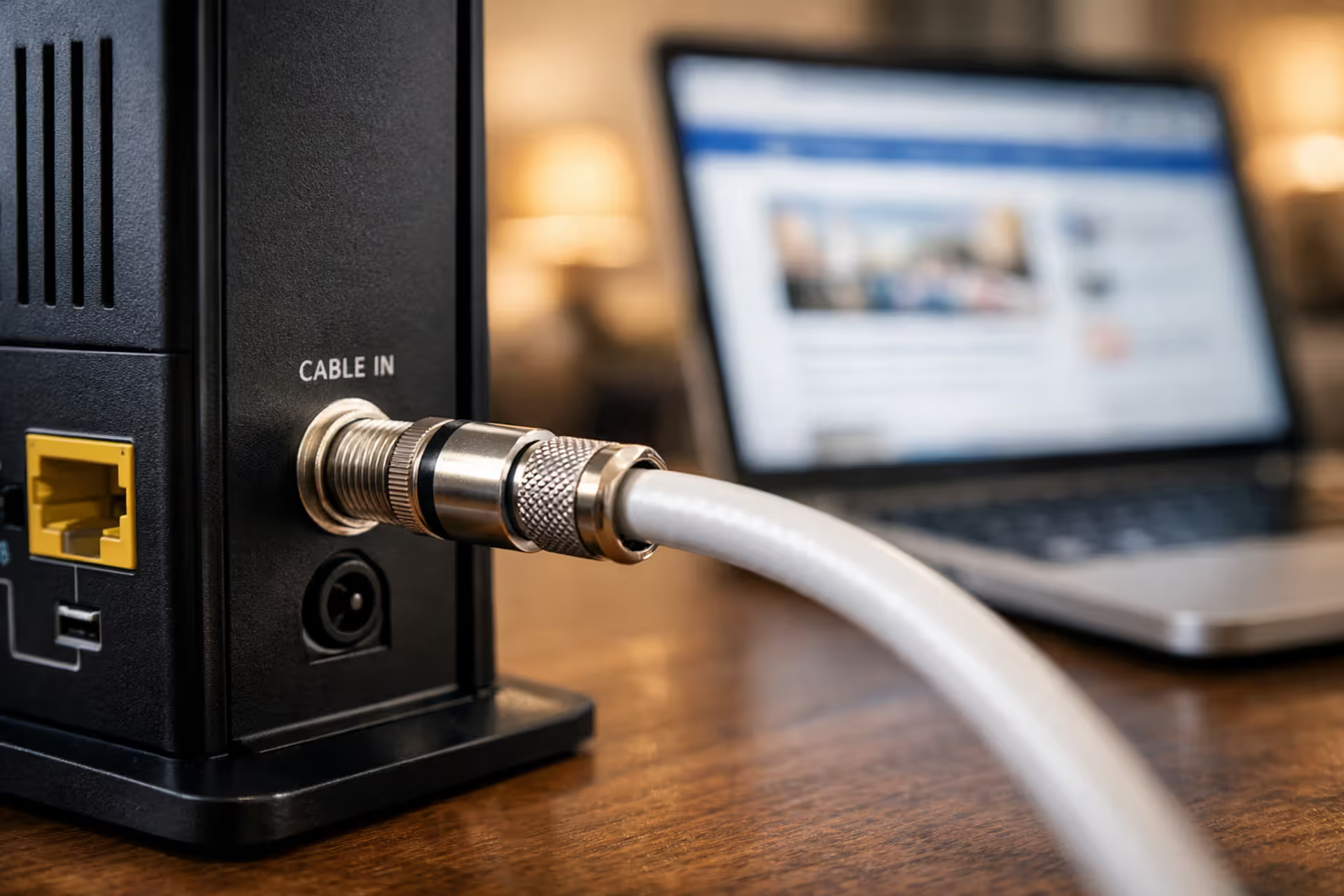
Close-up of a coaxial cable connected to a cable modem on a desk in a modern home with a laptop in the background
What Is Cable Internet — Speeds, Technology, Pros, Cons Explained

Cable internet delivers broadband connectivity through the same coaxial cables that bring television signals into millions of American homes. Unlike DSL, which relies on phone lines, or fiber, which requires entirely new infrastructure, cable internet leverages an existing network built decades ago for cable TV. This gives it a massive coverage advantage—roughly 89% of U.S. households can access cable internet, making it the most widely available high-speed option outside major metro areas.
The technology works by transmitting data as electrical signals through copper-core coaxial cables. Your internet service provider (ISP) converts digital information into radio frequency signals that travel alongside TV channels through these cables. A cable modem in your home then decodes these signals back into digital data your devices can use. While the basic concept sounds straightforward, the engineering behind modern cable internet involves sophisticated protocols, shared network architecture, and continuous evolution to meet growing bandwidth demands.
Cable Internet Explained: The Technology Behind Your Connection
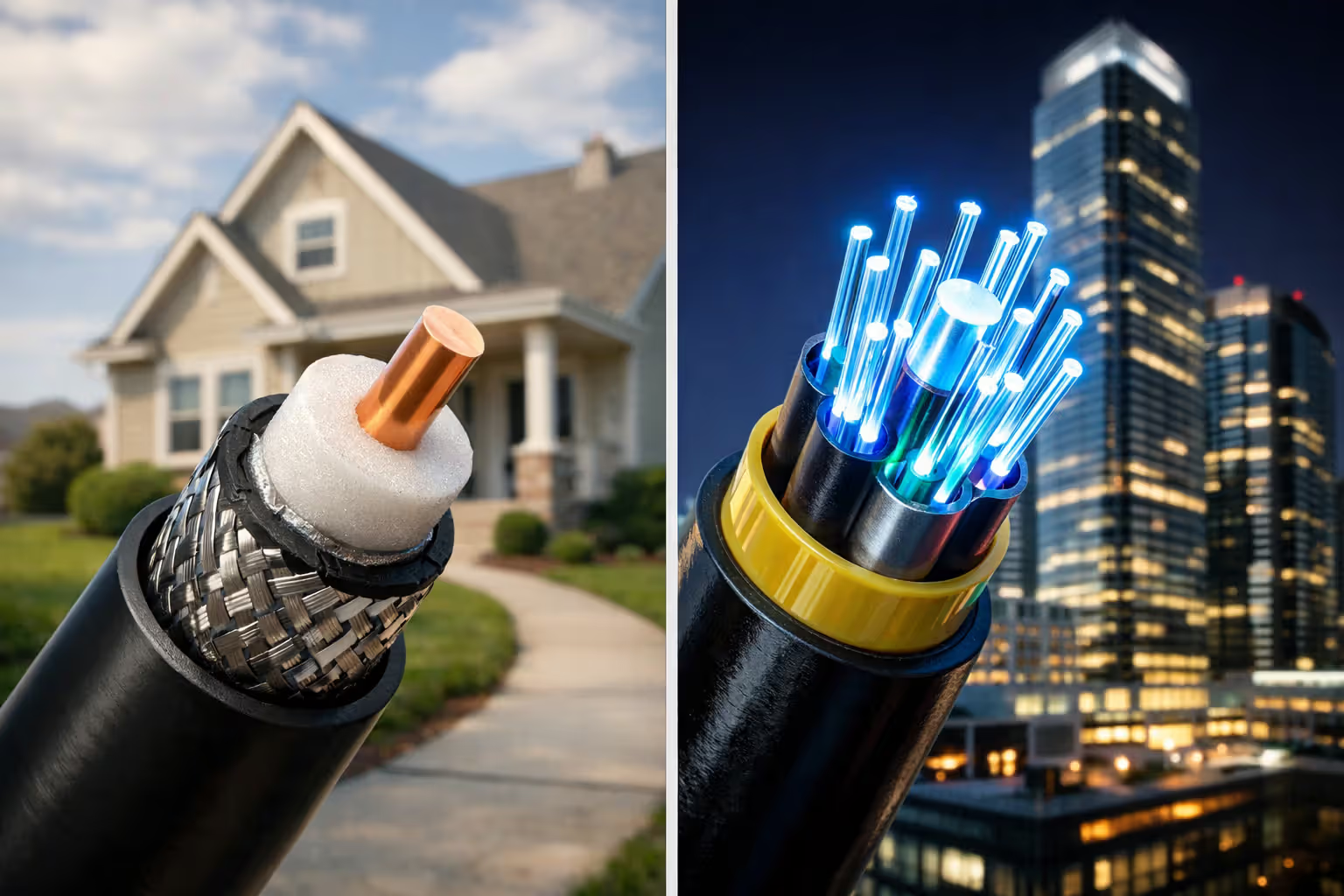
At its core, cable internet meaning centers on coaxial cable infrastructure—those thick, round cables with screw-on connectors that have been standard in American homes since the 1980s. These cables consist of a copper core surrounded by insulation, a metallic shield, and an outer plastic jacket. This design allows them to carry multiple frequencies simultaneously without interference, which is why you can watch TV and browse the internet through the same physical wire.
Most modern cable networks use a hybrid fiber-coaxial (HFC) architecture. Your ISP's main data center connects to neighborhood nodes via fiber-optic cables, which carry signals at light speed with minimal loss. From these nodes—typically serving 500 to 2,000 homes—coaxial cables branch out to individual houses. This hybrid approach combines fiber's long-distance efficiency with coaxial cable's established last-mile presence.
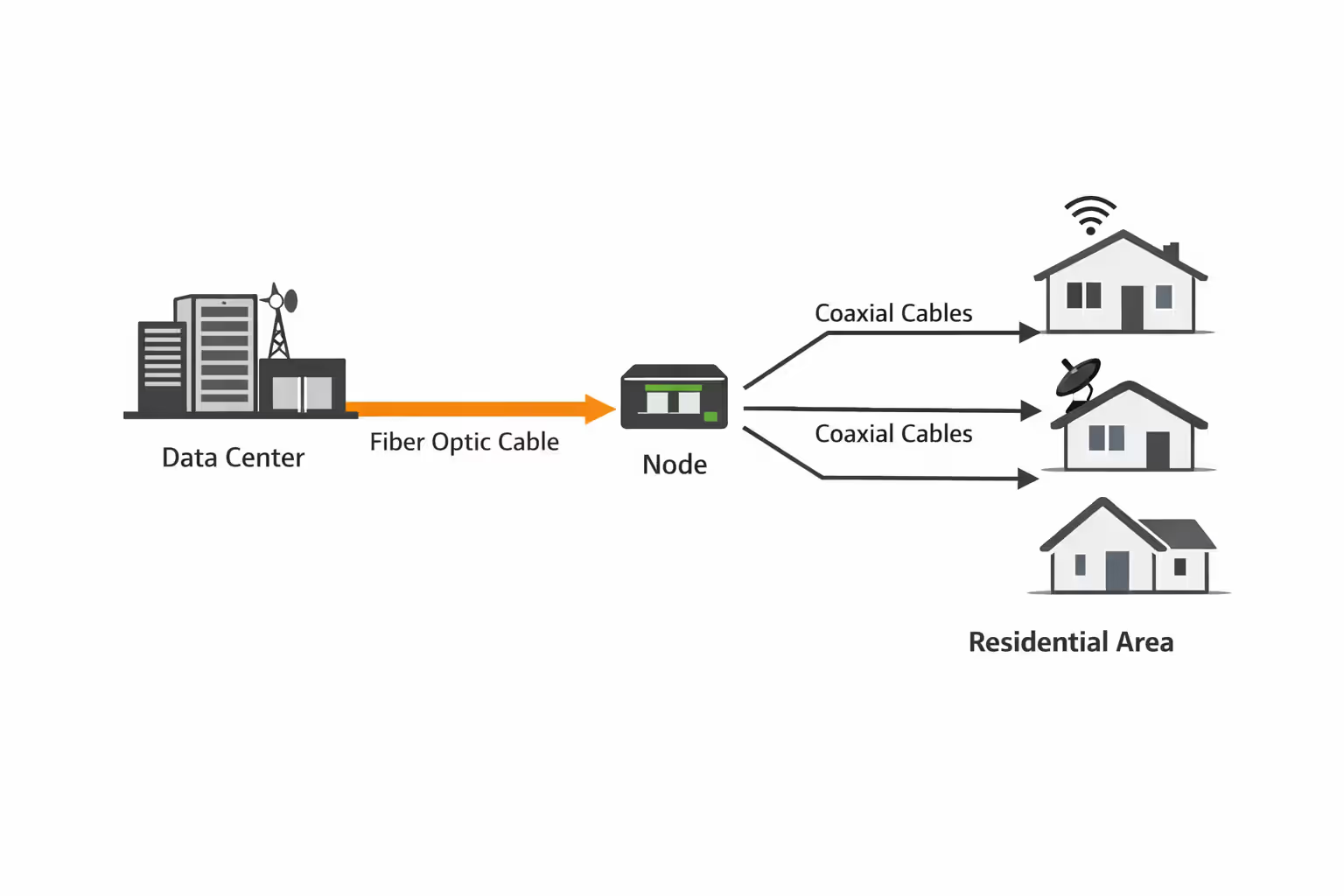
Author: Tyler Beaumont;
Source: flexstarsolutions.com
Data travels through cable lines using a standard called DOCSIS (Data Over Cable Service Interface Specification). Think of DOCSIS as the rulebook that governs how cable modems and ISP equipment communicate. It defines everything from which radio frequencies carry download versus upload data to how multiple households share the same cable line without their signals interfering.
When you request a webpage, your cable modem sends the request upstream to your ISP's cable modem termination system (CMTS) at the neighborhood node. The CMTS routes your request to the broader internet, receives the response, and sends it back downstream to your modem. This entire round trip typically takes 15-30 milliseconds under normal conditions.
The catch? Unlike a dedicated fiber line to your home, that coaxial cable running through your neighborhood is shared. Everyone connected to the same node splits the available bandwidth, which creates the performance variability cable internet is known for.
DOCSIS Versions and What They Mean for Your Internet Speed
DOCSIS explained simply: each new version expands the highway lanes available for data traffic. The version your cable modem supports directly determines your maximum possible speeds, regardless of what plan you're paying for.
DOCSIS 3.0 debuted in 2006 and remains common in many households. It supports theoretical download speeds up to 1 Gbps by bonding multiple channels together—typically 24 or 32 downstream channels. Upload speeds max out around 200 Mbps using 8 upstream channels. If you're on a plan faster than 100 Mbps with a DOCSIS 3.0 modem, you're likely not getting what you pay for during peak hours.
DOCSIS 3.1 launched in 2013 and represents a significant leap. It can theoretically deliver 10 Gbps download and 1-2 Gbps upload speeds by using spectrum more efficiently. Instead of just bonding more channels, DOCSIS 3.1 employs advanced modulation techniques that pack more data into the same frequencies. Most cable providers offering gigabit plans require DOCSIS 3.1 modems. The upstream improvement matters more than the raw numbers suggest—jumping from 35 Mbps to 200+ Mbps upload makes video conferencing and cloud backups dramatically more practical.
DOCSIS 4.0 began rolling out in 2023, promising symmetrical multi-gigabit speeds—up to 10 Gbps in both directions. This addresses cable's historic upload speed disadvantage. However, deployment remains limited to select markets, and consumer equipment supporting the standard is just emerging. Don't expect widespread availability before 2025-2026.
DOCSIS 4.0 represents cable's answer to fiber's symmetrical bandwidth advantage. The technology can deliver symmetrical 2-4 Gbps speeds over existing coax infrastructure with node upgrades, which is far more economical than replacing every cable with fiber
— Dr. Jennifer Andreoli-Fang
Why your modem's DOCSIS version matters comes down to bottlenecks. Imagine paying for a 500 Mbps plan but using a DOCSIS 3.0 modem with only 16 bonded channels. During evening hours when your neighbors are streaming, your effective speed might drop to 150 Mbps because your modem can't efficiently compete for bandwidth. A DOCSIS 3.1 modem on the same plan would maintain speeds closer to 400-450 Mbps under identical conditions.
Cable Internet Speed and Performance: What to Expect
Cable internet speeds typically range from 100 Mbps entry-level plans to 1,200 Mbps (1.2 Gbps) premium tiers, though availability varies by provider and location. The actual performance you experience depends on your plan, equipment, network congestion, and how your household uses the connection.
Download speeds usually match or come close to advertised rates during off-peak hours. A 300 Mbps plan might deliver 280-310 Mbps when you test at 2 PM on a Tuesday. Run that same test at 8 PM on a Friday, and you might see 180-220 Mbps. This fluctuation stems from the shared bandwidth architecture we'll explore shortly.
Cable upload speed limits present the more frustrating constraint. Most cable plans offer asymmetric bandwidth—fast downloads but comparatively slow uploads. A 300 Mbps plan typically includes just 10-15 Mbps upload on older DOCSIS 3.0 infrastructure, or 20-35 Mbps with DOCSIS 3.1. Even gigabit cable plans often cap uploads at 35-50 Mbps, though newer deployments can reach 100-200 Mbps.
This asymmetry made sense when cable internet launched. Most users downloaded far more than they uploaded—streaming movies, browsing websites, downloading files. But today's internet usage patterns have shifted. Video calls upload HD video continuously. Cloud storage syncs gigabytes of photos. Remote workers upload large files to corporate servers. That 15 Mbps upload becomes a genuine bottleneck when you're trying to join a Zoom call while your teenager uploads a school project.
Cable internet latency—the delay before data transfer begins—typically ranges from 15-35 milliseconds to nearby servers under good conditions. This is adequate for most applications. Competitive gaming remains viable, though serious esports players often prefer fiber's sub-10ms latency. Video calls work fine. Streaming services buffer without issue. Where you'll notice cable latency is during network congestion, when ping times can spike to 50-100ms or higher.
| Speed Tier | Typical Download | Typical Upload | Best For | Avg. Monthly Cost |
| Basic | 100-200 Mbps | 10-20 Mbps | 1-2 users, streaming HD, basic browsing | $40-$60 |
| Standard | 300-500 Mbps | 15-35 Mbps | 3-4 users, multiple 4K streams, moderate gaming | $60-$80 |
| Premium | 600-1000 Mbps | 35-50 Mbps | 5+ users, heavy streaming, gaming, smart home | $80-$120 |
| Gigabit+ | 1000-1200 Mbps | 50-200 Mbps | Power users, content creators, large households | $100-$150 |
Real-world scenario: A household with two remote workers, two kids streaming after school, and smart home devices needs to consider both download and upload carefully. A 300 Mbps plan handles the download demand easily—even four simultaneous 4K streams only consume about 100 Mbps total. But if both parents have video calls at 9 AM, they're competing for perhaps 20 Mbps upload, and someone's video will stutter or freeze.
The Shared Bandwidth Problem: Why Your Speed Fluctuates
Shared bandwidth cable represents the fundamental trade-off in cable internet architecture. Unlike fiber-to-the-home, where you get a dedicated strand of fiber, your coaxial cable connection shares capacity with dozens or hundreds of neighbors connected to the same node.
Picture a neighborhood node serving 800 homes with a total capacity of 10 Gbps downstream. If only 50 households are actively using internet at 2 PM on a weekday, each connection has plenty of headroom. Your 500 Mbps plan gets full speed because the node is operating at maybe 15% capacity. But at 8 PM when 400 households are streaming, gaming, and video calling simultaneously, that same node might hit 80-90% utilization. Now your 500 Mbps plan delivers 300 Mbps because you're competing with everyone else for the same shared pipe.
Peak usage times create predictable congestion patterns. Weekday evenings from 6-11 PM see the heaviest usage as people stream dinner entertainment and evening shows. Sunday afternoons spike when families are home. The first week of school brings congestion from students on video calls. Major sporting events or new streaming releases can overwhelm local nodes.
Network node capacity issues vary dramatically by provider and neighborhood. Cable companies continuously monitor utilization and perform "node splits" when congestion becomes chronic—dividing an overloaded node serving 1,000 homes into two nodes serving 500 each, effectively doubling capacity per household. Well-managed networks maintain node utilization below 60-70% during peak hours. Poorly managed networks let nodes run at 90%+ capacity, causing consistent slowdowns.
You can't fix shared bandwidth from your end, but you can work around it. Schedule large downloads or uploads for off-peak hours—early morning or mid-afternoon. If you work from home with strict bandwidth requirements, test your speeds at the times you'll actually be working. A plan that delivers 200 Mbps at 2 PM but drops to 80 Mbps at 10 AM when you're on video calls isn't meeting your needs, even though it technically provides the advertised speed "up to" 200 Mbps.

Author: Tyler Beaumont;
Source: flexstarsolutions.com
Cable vs Fiber Internet: A Side-by-Side Comparison
The cable vs fiber internet debate ultimately comes down to availability, performance needs, and budget. Fiber offers superior technical specifications, but cable's widespread deployment makes it the only high-speed option for millions of Americans.
Speed capabilities differ significantly at the high end. Cable internet tops out around 1,200 Mbps for residential service with current DOCSIS 3.1 technology, though most providers cap plans at 1,000 Mbps. Fiber routinely offers 1,000-2,000 Mbps plans, with some providers delivering 5 Gbps or even 10 Gbps in select markets. For typical household needs—streaming, gaming, remote work—both technologies provide more than enough download bandwidth.
The symmetrical vs asymmetrical bandwidth distinction matters more in practice. Fiber delivers identical upload and download speeds: a 1 Gbps fiber plan means 1 Gbps in both directions. Cable's asymmetric nature means that same 1 Gbps plan likely includes just 35-50 Mbps upload. Content creators uploading 4K video, remote workers backing up to cloud servers, or households with multiple simultaneous video calls benefit enormously from fiber's symmetrical bandwidth.
Reliability and weather resistance favor fiber substantially. Fiber-optic cables transmit light through glass and are immune to electrical interference, corrosion, and most weather conditions. Coaxial cables carry electrical signals that can degrade from water damage, corroded connectors, or interference from other electrical sources. Heavy rain, extreme cold, or physical damage to aerial cables affects cable internet more frequently than fiber.
| Feature | Cable Internet | Fiber Internet |
| Max Download Speed | 1,000-1,200 Mbps (DOCSIS 3.1) | 1,000-10,000 Mbps |
| Upload Speed | 10-200 Mbps (asymmetric) | Matches download (symmetric) |
| Latency | 15-35ms typical | 5-15ms typical |
| Reliability | Moderate (weather-sensitive) | High (weather-resistant) |
| Availability | ~89% of US households | ~43% of US households |
| Typical Cost | $50-$100/month | $60-$120/month |
Availability and pricing differences create the real decision point for most consumers. Cable internet reaches nearly 90% of U.S. households, including most suburban and many rural areas. Fiber availability remains concentrated in urban and newer suburban developments, covering roughly 43% of households. If you can't get fiber, the comparison is academic.
Pricing varies by market, but fiber and cable often cost similarly for equivalent download speeds. A 500 Mbps cable plan and 500 Mbps fiber plan might both run $70-$80 monthly. The fiber connection delivers dramatically better upload speeds for the same price, making it the better value where available. Cable sometimes undercuts fiber on entry-level plans, offering 200 Mbps for $50 versus fiber's $60 for the same speed.
Advantages and Disadvantages of Cable Internet
When Cable Internet Makes Sense
Wider availability than fiber makes cable the default choice for tens of millions of households. If you live outside major metro areas, cable might be your only option beyond DSL or satellite for speeds above 100 Mbps. The infrastructure is already in place, so you can typically get service installed within a week of ordering.
Cost-effectiveness for moderate users represents cable's sweet spot. A family that streams video, browses social media, and does light gaming doesn't need gigabit speeds or symmetrical bandwidth. A 300 Mbps cable plan for $60-$70 monthly provides plenty of capacity for these use cases. You're not paying a premium for features you won't use.
Sufficient for most household needs remains true despite cable's technical limitations. The median U.S. household uses about 400-600 GB of data monthly, mostly downloads. Four people can stream 4K video simultaneously on a 300 Mbps connection with bandwidth to spare. Casual gaming works fine with 20-30ms latency. Basic video calls don't require more than 5-10 Mbps per participant.
Cable internet also typically comes with flexible plan options. Most providers offer 4-6 speed tiers, letting you match your plan to your usage without overpaying. Many bundle internet with TV or phone service, though these bundles increasingly make less financial sense as streaming replaces cable TV.
Author: Tyler Beaumont;
Source: flexstarsolutions.com
Limitations You Should Know About
Upload speed bottlenecks for content creators represent cable's most significant drawback for specific user groups. If you regularly upload large video files, run a YouTube channel, or backup hundreds of gigabytes to cloud storage, cable's 15-35 Mbps upload speeds become genuinely frustrating. A 50 GB video file takes about 4 hours to upload at 30 Mbps, versus 30 minutes on a 300 Mbps fiber upload.
Shared bandwidth during peak hours affects everyone but impacts some users more than others. If your work-from-home schedule aligns with peak evening hours—say, you're on West Coast time taking calls with East Coast colleagues at 6-9 AM—you might not notice congestion. But households where everyone needs bandwidth simultaneously at 7-9 PM will experience regular slowdowns.
Not ideal for symmetrical needs extends beyond content creators. Remote workers uploading to corporate VPNs, households with multiple simultaneous video calls, gamers streaming their gameplay, and anyone running servers or hosting services all benefit from higher upload speeds. Cable's asymmetric design wasn't built for these use cases.
Equipment rental fees add hidden costs. Most cable providers charge $10-$15 monthly to rent a modem/router combo. Over two years, that's $240-$360—enough to buy your own DOCSIS 3.1 modem and quality router. Providers often make returning equipment difficult when you cancel service, sometimes charging for unreturned equipment you've already mailed back.
Contract requirements and price increases also plague cable internet. Promotional rates expire after 12-24 months, sometimes doubling your monthly bill. Cancellation fees can reach $200-$300 if you leave before your contract ends. Reading the fine print matters more with cable providers than with many fiber competitors offering no-contract service.
Frequently Asked Questions About Cable Internet
Cable internet remains America's most accessible high-speed broadband option, delivering sufficient performance for most households at competitive prices. The technology has evolved dramatically from its cable-TV origins, with DOCSIS standards enabling gigabit speeds over the same coaxial cables that once carried only television signals.
Understanding cable's shared bandwidth architecture and asymmetric speed allocation helps set realistic expectations. Your 500 Mbps plan won't always deliver 500 Mbps, especially during peak evening hours when neighbors are streaming and gaming. Upload speeds will lag far behind downloads, which matters more as video calls and cloud services become everyday necessities rather than occasional uses.
For households with moderate internet needs—streaming video, browsing, casual gaming, and occasional video calls—cable internet delivers solid value. The widespread availability means you can likely get service without waiting months for new infrastructure. Equipment is standardized and affordable to purchase outright. Performance is predictable enough for planning your household's internet usage.
But cable isn't the best choice for everyone. Content creators uploading large files, remote workers with symmetrical bandwidth needs, or households requiring guaranteed speeds during peak hours should choose fiber where available. The price difference is often minimal, and fiber's technical advantages—symmetrical speeds, lower latency, better reliability—justify the extra cost for users who'll actually benefit from them.
The cable internet landscape continues evolving. DOCSIS 4.0 deployments will narrow the performance gap with fiber over the next few years, bringing multi-gigabit symmetrical speeds to existing coaxial infrastructure. Until then, cable serves as the reliable workhorse of American broadband—not the fastest or most advanced, but available, affordable, and adequate for the majority of users who simply want their internet to work without thinking about the technology delivering it.
Related Stories
Read more
Read more



The content on this website is provided for general informational and educational purposes only. It is intended to offer guidance on internet technology topics, including internet providers, connection types (fiber, cable, and 5G home internet), WiFi setup, router configuration, internet speed requirements, and online security practices. The information presented should not be considered technical, legal, or professional networking advice.
All information, articles, comparisons, and technical explanations on this website are for general informational purposes only. Internet service availability, performance, speeds, equipment requirements, and security features may vary by provider, location, infrastructure, and individual network configuration. Actual internet performance and reliability depend on many factors, including hardware, service plans, local network conditions, and user behavior.
This website is not responsible for any errors or omissions in the content or for actions taken based on the information provided. Reading this website does not create a professional or service relationship. Users are encouraged to consult with their internet service provider, network specialist, or qualified technical professional for advice specific to their internet setup, equipment, or connectivity needs.